Home / Docs Center / Product Datasheets / HDMI/VGA Combo Encoder E111
HDMI/VGA Combo Encoder E111
Project: Product Specification | page_id: 1653
| HDMI/VGA 2-in-1 Encoder (E111) | |
|---|---|
| Model | XSWEDR-SLHDMI-LC-E111 |
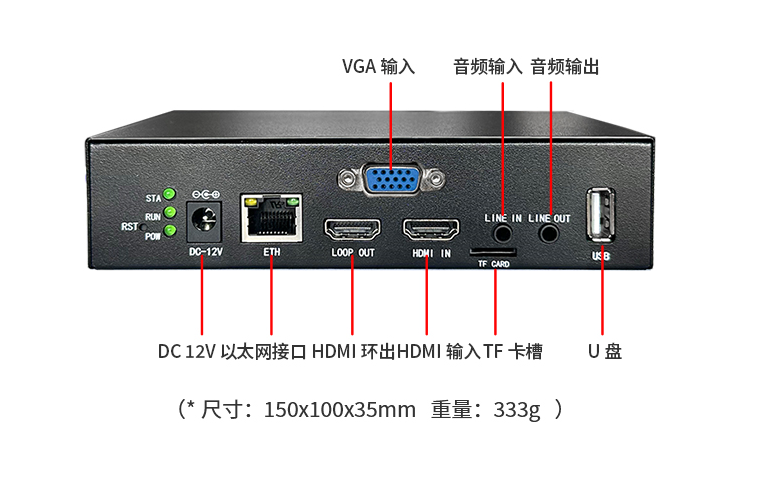
| Video Input | 1-channel HDMI input interface (max resolution 4K@60), 1-channel VGA input, max 1080p@60fps |
| Video Output | 1-channel HDMI output interface (same as video input) |
| Audio Input | 1-channel stereo analog audio input interface / HDMI embedded audio |
| Audio Output | 1-channel stereo analog audio output interface (supports rtmp audio stream decoding) |
| Audio Decoding | Supports decoding AAC audio through the rtmp protocol |
| Image Overlay Function | Supports PNG image overlay, supports GIF animation overlay, supports text and scrolling text overlay |
| Portrait Mode | Supports 90°, 180° and 270° video rotation |
| Video Encoding Capability | 1080p@60fps/2560x1440@30fps |
| Network Interface | 100M Ethernet port |
| Network Video Output Protocol | SRT/RTSP/RTMP/RTMPS/UDP-TS/HLS/WS-FLV/HTTP_TS/WS-RAW/webRTC/GB28181 client/ONVIF |
| Output Video Encoding Format | H.264/H.265 |
| Output Audio Encoding Format | AAC |
| Audio Encoding Bitrate | 8Kbit/s~256Kbit/s |
| Video Encoding Bitrate | 35Kbps~16Mbps |
| Remote Upgrade | Supported |
| Remote Management | Supports remote modification of device parameters; can be used after registration at platform.xstrive.com |
| Power Supply | DC 12V |
| Operating Temperature | 0 to 70℃ |
| Dimensions | 150x100x35mm |
| Weight | 333.1g |
Product Images
Product Mounting Hole Dimensions
Product Manual Link (Chinese Version)
In-site Docs Center
Encoder WebRTC Push Operation Demo
FAQ
| Question | Answer |
|---|---|
| 1. How many devices can play at the same time? How to implement it if there are 20 advertising players? | At a bitrate of 2M, about 6 devices. For 20 advertising players, a 20-channel pusher is required, or UDP multicast can be used |
| 2. There is image but no sound when pushing streams. Does it need to be set separately? | In the advanced settings, select the audio source as the video source |
| 3. Can a camera be connected outdoors and the video be transmitted to a remote live room through a WiFi network? | WiFi is not supported; you can choose an encoder that supports WiFi: https://item.taobao.com/item.htm?spm=a21dvs.23580594.0.0.1d293d0dluLM97&ft=t&id=723156582989 |
| 4. What are the advantages of this compared with installing a camera on a computer? | It does not occupy computer resources |
| 5. Is the Douyin companion tool still needed? | If you have the Douyin push address, the Douyin companion tool is not needed |
| 6. Is there a limit on the number of users for LAN live streaming? | Yes, the CPU performance is limited, and it is recommended not to exceed 10 terminals |
| 7. Can the image be switched? | The image cannot be switched |
| 8. How large is the memory? | 128M |
| 9. What is the power of this product? | About 2W |
| 10. Is the network port a Gigabit port or a 100M port? | This model has a 100M port |
| 11. Can VGA and HDMI be connected at the same time? | Only one channel can be used at a time; when both are plugged in, HDMI is used by default |
| 12. Does the output have B frames? | B frames are not supported |
| 13. Is the HDMI output rate control CBR? | The CBR/VBR bitrate mode can be adjusted |
| 14. What is the audio sampling frequency? | The maximum supported audio sampling rate is 48000 |
| 15. Can the audio sampling rate be modified? | The sampling rate of HDMI embedded audio cannot be modified on the web page, but that of the 3.5mm analog audio input can |
| 16. The video sound uses the 3.5mm audio input and the SD card is used for recording. Will this sound be recorded synchronously? | Yes, the sound will be recorded synchronously |
| 17. Can the 3.5mm audio be input separately for encoding? | Yes, set it to audio-only mode on the web page |
| 18. Does this encoder not support WebRTC push? | WebRTC is supported |
Didn't find what you need?Contact us,Talk to our engineers directly.