Home / Docs Center / Product Datasheets / Single-Channel HDMI Encoder
Single-Channel HDMI Encoder
Project: Product Datasheet | page_id: 153
| Single-channel HDMI Encoder | |
|---|---|
| Model | XSWEDR-SHDMI |
| Video Input | 1 x HDMI input interface |
| Audio Input | 1 x stereo analog audio input interface / HDMI embedded audio |
| Video Encoding Capability | 1920x1080p@60fps |
| Network Video Output Protocol | SRT/RTSP/RTMP/RTMPS/UDP-TS/HLS/WS-FLV/WS-RAW/WEBRTC/GB28181 client/ONVIF |
| Output Video Encoding Format | H.264/H.265 |
| Output Audio Encoding Format | AAC |
| Video Encoding Bitrate | 35Kbps~10Mbps |
| Remote Upgrade | Supported |
| Remote Management | Supports remote modification of device parameters. Register at platform.xstrive.com to use. |
| Power Supply | DC 12V |
| Operating Temperature | 0~70℃ |
| Dimensions | 20x50x83mm |
| Weight | 71g |
Product Images
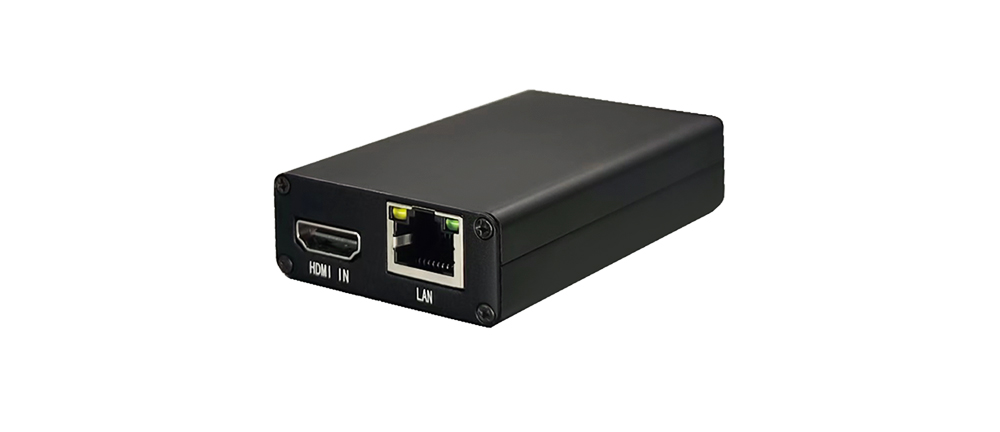
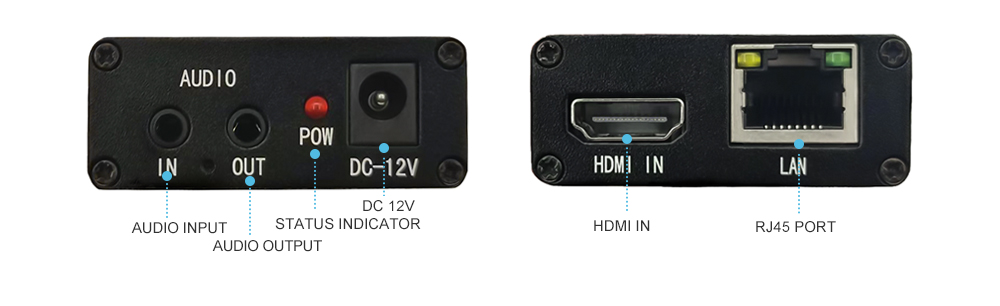
Product Manual Link (Chinese)
In-site Docs Center
Device FAQ
| Question | Answer |
|---|---|
| 1. What chip does the encoder use? | HiSilicon 3516AV100 |
| 2. How many devices can play at the same time? How do I implement it if there are 20 advertising displays? | About 10. For 20 advertising displays, you need to use a 20-channel video encoder together with it. |
| 3. There is picture but no sound when streaming. Does it need separate settings? | In Advanced Settings, select "from video source" for audio. |
| 4. Can it be connected to a camera outdoors and transmitted to a remote live studio over a WiFi network? | This model does not support WiFi. Choose an encoder that supports WiFi: https://item.taobao.com/item.htm?spm=a21dvs.23580594.0.0.1d293d0dluLM97&ft=t&id=723156582989 |
| 5. What are the advantages compared with connecting a camera to a computer? | It does not occupy computer resources. |
| 6. Is Douyin Live Companion still needed? | If you have a Douyin streaming address, Douyin Live Companion is not needed. |
| 7. Is there a limit on the number of users for intranet live streaming? | Yes, CPU performance is limited. |
| 8. Can the picture be switched? | The picture cannot be switched. |
Didn't find what you need?Contact us,Talk to our engineers directly.