Product Overview
Project: Product Specification | page_id: 1747
HDMI HD Recording Box — Product Introduction Card
Target audience: first sales introduction, quick customer understanding, exhibition / official website display
Version: V1.0 | Updated: 2026-05-20 | Owner: Wuhan XSTRIVE Technology Co., Ltd.
Product Positioning in One Sentence
Professional HDMI video recording device — loop-out monitoring while recording, USB flash drive local storage + web remote management
Core Product Value
| Core Capability | What Problem It Solves |
|---|---|
| HDMI input + loop-out monitoring | Preview the input picture in real time while recording, no additional splitter required |
| USB flash drive local recording | No computer needed; just plug in a USB flash drive to record, with flexible and expandable storage |
| Web remote management | Log in to the backend through a browser to configure parameters, view/download recordings, and perform remote O&M |
| H.264/H.265 dual encoding | Good compatibility + high compression ratio, saving storage space |
Product Appearance and Interfaces
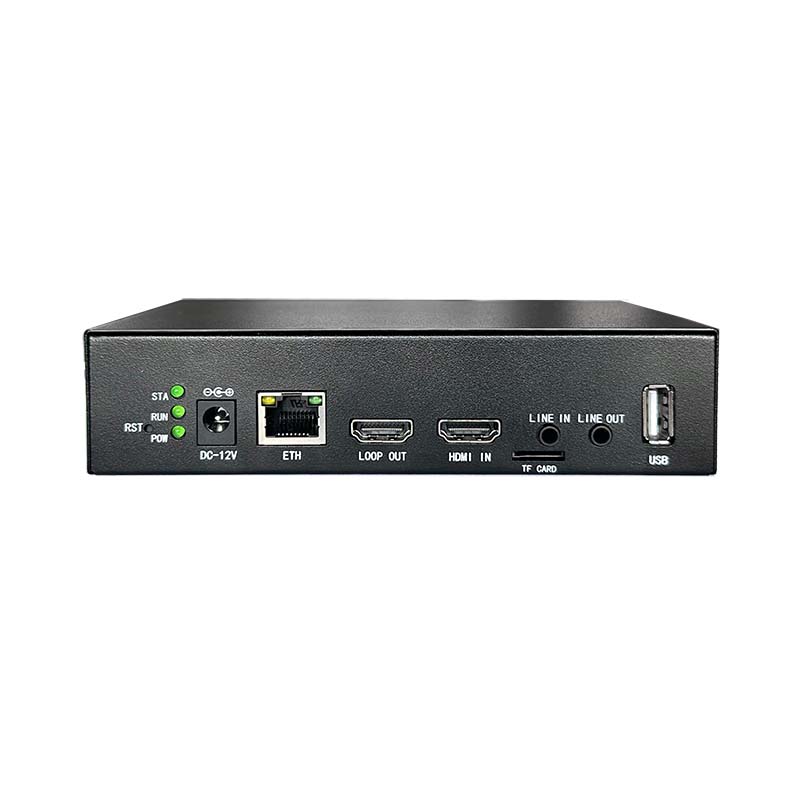
Typical Working Topology
📹 Video source (computer/NVR/camera)
      │
      │ HDMI cable
      ▼
┌─────────────────┐
│  HDMI Recording Box    │◀─── USB flash drive (exFAT) → Local video storage
│                 │
│  ┌───────────┐  │
│  │ HDMI IN   │◀─┼── Video input
│  │ HDMI OUT  │─┼──▶ Loop-out to a monitor (real-time preview)
│  │ USB       │◀─┼── USB flash drive recording
│  │ ETH       │◀─┼── Network cable → Web backend management
│  │ AUDIO IN  │◀─┼── Microphone input (optional)
│  └───────────┘  │
└─────────────────┘
Applicable Scenarios
| Scenario | Application Method | Core Benefit |
|---|---|---|
| Conference recording | Records the HDMI signal in a meeting room | Meeting archiving, review and replay, catch-up for absentees |
| Teaching live streaming | Records courseware + the teacher's picture | Course archiving, online replay, premium course production |
| Medical image recording | Records surgery/examination pictures | Case archiving, teaching demonstration, remote consultation material |
| Security surveillance | Records the NVR output picture | Backup of key periods, forensic material |
| Game recording | Records game console/PC pictures | Saving game highlights, content creation |
Product Specification Overview
| Item | Parameter |
|---|---|
| Model | XSWEDR-SLHDMI-LC-E11 |
| Video Input | 1 network HDMI input interface |
| Video Output | 1 HDMI output interface (loop-out preview) |
| Audio Input | 1 stereo microphone input / HDMI embedded audio |
| Network Interface | 100M Ethernet port |
| Video Encoding | H.264 / H.265 |
| Audio Encoding | AAC |
| Storage | USB flash drive (exFAT format) |
| Remote Management | Supported (platform.axtrive.com) |
| Power Supply | DC 12V |
| Operating Temperature | 0~70℃ |
| Dimensions | 150×100×35mm |
| Weight | 333.1g |
Packing List
| Item | Quantity | Notes |
|---|---|---|
| HDMI recording box main unit | ×1 | |
| 12V power adapter | ×1 | |
| Network cable | ×1 | |
| HDMI cable (1m) | ×1 | Must support 4K@60 |
| USB flash drive (32GB) | ×1 | Pre-formatted as exFAT |
Comparison with Competitors / Alternative Solutions
| Comparison Item | Traditional capture card + computer recording | HDMI recording box |
|---|---|---|
| Is a computer required | ✅ The computer must be on to record | ❌ No computer needed, just plug in a USB flash drive |
| Real-time preview | Requires an additional splitter or software preview | ✅ HDMI loop-out, directly connected to a monitor |
| Storage method | Computer hard disk | ✅ USB flash drive, flexibly expandable, plug and use |
| Remote management | Requires remote desktop or on-site operation | ✅ Web backend for remote configuration/viewing |
| Deployment complexity | High (driver installation, software configuration) | ✅ Low (connect the cables and use) |
| Cost | Capture card + computer > ¥3000 | ✅ Recording box standalone < ¥1000 |
FAQ
Q1: Are there any format requirements for the USB flash drive?
A: It must be formatted as exFAT. The USB flash drive included with the device is pre-formatted and can be used directly.
Q2: Can I see the picture while recording?
A: Yes. The HDMI OUT loop-out interface can be connected to a monitor to preview the input picture in real time; recording and monitoring proceed simultaneously.
Q3: How do I view the recorded video?
A: There are two methods: ① unplug the USB flash drive and play it on a computer; ② log in to the device backend through a browser to view or download it online.
Q4: Does it support multiple inputs?
A: This model has a single HDMI input. For multi-channel recording, please consult us about multi-channel models.
Q5: How is the device managed remotely?
A: After the device is connected to the network, register an account on the platform platform.axtrive.com, bind the device, and you can remotely modify parameters and view recordings.
This product introduction card is for sales promotion; for detailed technical parameters, please refer to the product specification.