Home / Docs Center / Product Datasheets / 4G Video Encoder
4G Video Encoder
Project: Product Datasheet | page_id: 142
| 4G Video Encoder | |
|---|---|
| Model | XSWTVR-7M16CH4G |
| Network Device Discovery | ONVIF |
| Network Video Input Protocol | RTSP |
| Network Video Output Protocol | HTTP-FLV/RTSP/RTMP/HLS/WS-FLV/WS-RAW/GB28181 client |
| Input Video Encoding Format | H264/H265 |
| Input Audio Encoding Format | AAC/G711 |
| Output Video Encoding Format | H264/H265 |
| Output Audio Encoding Format | AAC |
| Max Network Video Channels | 4 |
| Max Total Bitrate | 4Mbit (the actual value varies with the protocol and encoding format) |
| Recording | Not supported |
| Remote Upgrade | Supported |
| Remote Management | Supports remote modification of device parameters and remote playback of device recordings |
| Dimensions | 91x35x70mm |
| Weight | 89g |
| Power Supply | DC-12V |
| Operating Temperature | 0~70℃ |
Product Images
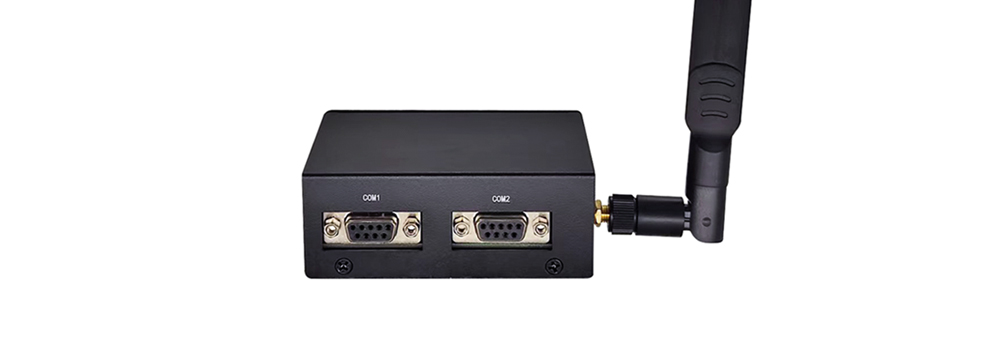
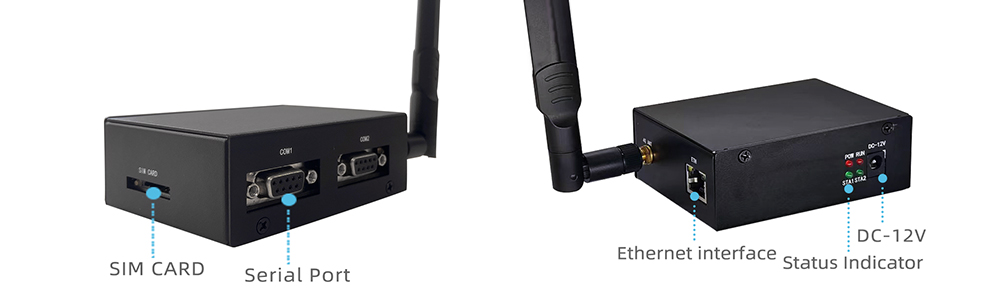
Product Manual Link (Chinese)
In-site Docs Center
Video Encoder FAQ and Troubleshooting
In-site Docs Center
Device FAQ
| Question | Answer |
|---|---|
| 1. How does this connect to surveillance devices? | Video is obtained from surveillance devices over the network on the LAN. |
| 2. Where can I see the SN of the 4G encoder box? | You need to log in and check it on the Status Overview page. |
| 3. What interface is this antenna? | SMA interface. |
| 4. Is a SIM card included? Are there restrictions on 4G cards? Are IoT cards OK? What about directional cards? | No SIM card is included; you can insert a SIM card. Unrestricted cards are supported, IoT cards are OK. For directional cards you need to contact your carrier to open these two domains and ports and add them to the whitelist. |
| 5. Is 4G in Hong Kong supported? | Currently all our 4G modules use the E20, which is recommended for mainland China, Hong Kong and Macau. Hong Kong certification is voluntary, so the mainland China model can be used. Taiwan is not supported; for Taiwan the 4G module must be replaced. If Taiwan support is needed, you can pay an extra 70 RMB to change the 4G module; after the change it can be used in Taiwan, Central Asia, Australia and New Zealand (except Iran and Russia). |
| 6. Is HDMI input supported? | No. HDMI encoders support it. |
Video Encoder UI_Channel Settings
Video Encoder Network Configuration_Recording Playback
Video Encoder. Password Change_API Authentication
Video Encoder webrtc_Login Configuration
Introduction to Various Video Pull Protocols of the Video Encoder
Introduction to Various Video Protocol Outputs of the Video Encoder
Video Encoder Status Overview and Channel Settings (including how to add a camera)
Introduction to the Video Encoder Scheduled Streaming Function
Introduction to Video Encoder Advanced Network Settings
Introduction to Video Encoder Recording, Scheduled Recording, Recording Playback and Download
Introduction to Video Encoder Audio Settings
Introduction to the Video Encoder Multi-screen Live Function
Introduction to Quick LAN Video Playback
Introduction to Video Encoder Backup and Restore
Video Encoder Serial Port Transparent Transmission and GPS File Download
Didn't find what you need?Contact us,Talk to our engineers directly.