Home / Docs Center / Product Datasheets / 18-Channel Encoder with 4G/WiFi/USB
18-Channel Encoder with 4G/WiFi/USB
Project: Product Datasheet | page_id: 855
| 20-Channel Video Encoder with 4G/WIFI | |
|---|---|
| Model | XSWTVR-3CERV1126USB/TX |
| Video Input | 1-channel USB camera input, 18-channel network video streams |
| Network Device Discovery | ONVIF |
| Network Video Input Protocol | HTTP/RTSP/RTMP/RTP/UDP-TS |
| Network Video Output Protocol | HTTP-FLV/RTSP/RTMP/UDP-TS/HLS/WS-FLV/WS-RAW/ONVIF/GB28181 |
| Input Video Encoding Format | H.264/H.265 |
| Input Audio Encoding Format | AAC/G.711 |
| Output Video Encoding Format | H.264/H.265 |
| Output Audio Encoding Format | AAC |
| Max Network Video Channels | 18 |
| Max Total Bitrate | 40Mbit (the actual value varies by protocol and encoding format) |
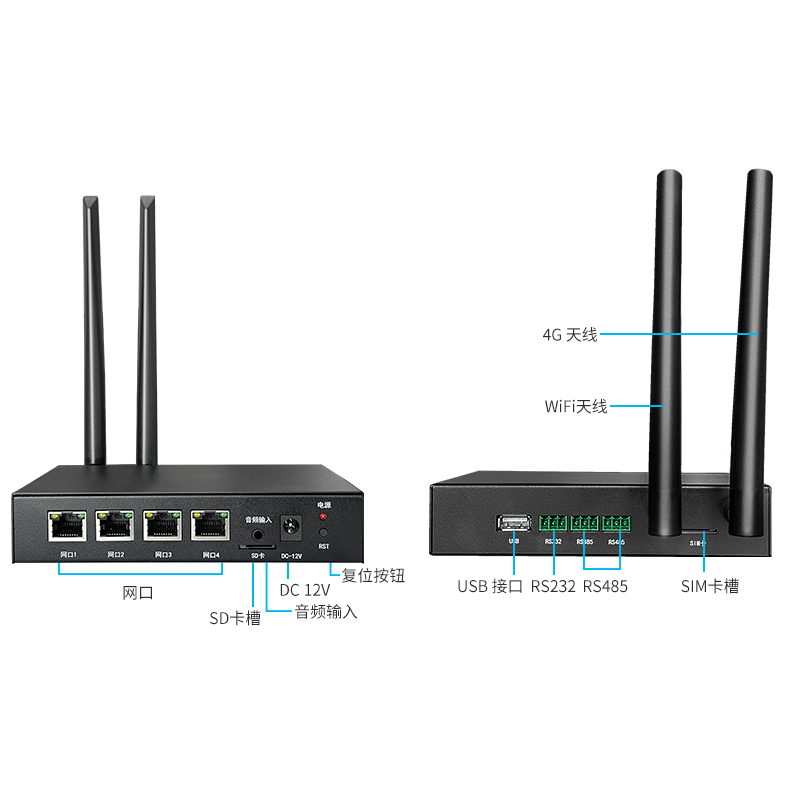
| Audio Input | 1-channel analog audio input, sampling rate: 16K/32K/48K |
| Storage | 8GB EMMC, supports external SD card up to 512GB |
| Communication | 485x2,RS232X1,TTLx1 |
| USB | USB 2.0 |
| Network | RJ45 4x 10/100M Ethernet ports, 2.4/5G WIFI, expandable CAT4 4G module |
| Remote Upgrade | Supported |
| Remote Management | Supports remote modification of device parameters and remote playback of device recordings |
| Dimensions | 100x90x31mm |
| Weight | 400g |
| Operating Temperature | 0 to 70℃ |
| Service Life | Continuous operation life of more than 3 years |
Product Images
Product Manual Link (Chinese Version)
In-site Docs Center
Video Encoder FAQ and Troubleshooting
In-site Docs Center
Device FAQ
| Question | Answer |
|---|---|
| 1、Can it receive 5.8G digital video transmission signals? | Only 5G WiFi is supported |
| 2、Can the 4 Ethernet ports span 4 network segments? | No, it cannot cross network segments; it can only be on one network segment and can connect directly to cameras |
| 3、Does the USB camera video input support 2K? | No, only 1080P USB cameras are supported |
| 4、What are the RS232 and RS485 interfaces for? | Those two are currently reserved interfaces and have no actual function |
| 5、Is PoE supported? | Not supported |
| 6、Can serial port passthrough be enabled? | This requires software modification. This function can be provided for bulk purchases, for a single purchase of more than 100 units |
| 7、How to tell which is the 4G antenna and which is the WiFi antenna? | The two are interchangeable |
Video Encoder Product Interface_Channel Settings
Video Encoder Network Configuration_Recording Playback
Video Encoder. Password Modification_API Authentication
Video Encoder WebRTC_Login Configuration
Introduction to Various Video Pull Protocols of the Video Encoder
Introduction to Various Video Protocol Outputs of the Video Encoder
Introduction to Video Encoder Status Overview and Channel Settings (includes how to add cameras)
Introduction to the Scheduled Streaming Function of the Video Encoder
Introduction to Advanced Network Settings of the Video Encoder
Introduction to Video Encoder Recording, Scheduled Recording, Recording Playback and Download
Introduction to Video Encoder Audio Settings
Introduction to the Split-Screen Live Streaming Function of the Video Encoder
Introduction to the Quick LAN Video Playback Method
Introduction to Video Encoder Backup and Restore
Video Encoder Serial Port Passthrough and GPS File Download
Didn't find what you need?Contact us,Talk to our engineers directly.