Home / Docs Center / Product Datasheets / FUVC Encoder
FUVC Encoder
Project: Product Datasheet | page_id: 515
| FUVC Video Encoder | |
|---|---|
| Model | XSWUVCR-50M1CH |
| USB Disk Requirement | exfat format, single drive letter |
| Network Video Input Protocol | HTTP/RTSP/RTMP/RTP/UDP-TS |
| Network Video Output Protocol | HTTP-FLV/RTSP/RTMP/UDP-TS/HLS/WS-FLV/WS-RAW/ONVIF |
| Input Video Encoding Format | H.264/H.265 |
| Input Audio Encoding Format | AAC/G.711 |
| Output Video Encoding Format | MJPEG UVC |
| Output Audio Encoding Format | PCM UAC |
| Max Network Video Channels | 1 |
| Max Total Bitrate | 50Mbit (the actual value varies by protocol and encoding format) |
| Recording | Supports recording to a USB disk |
| Remote Upgrade | Supported |
| Remote Management | Supports remote modification of device parameters and remote playback of device recordings |
| Dimensions | 270x216x45mm / 270x216x44 |
| Weight | 1051g / 1314.5g |
| Power Supply | DC-12V |
| Operating Temperature | 0~70℃ |
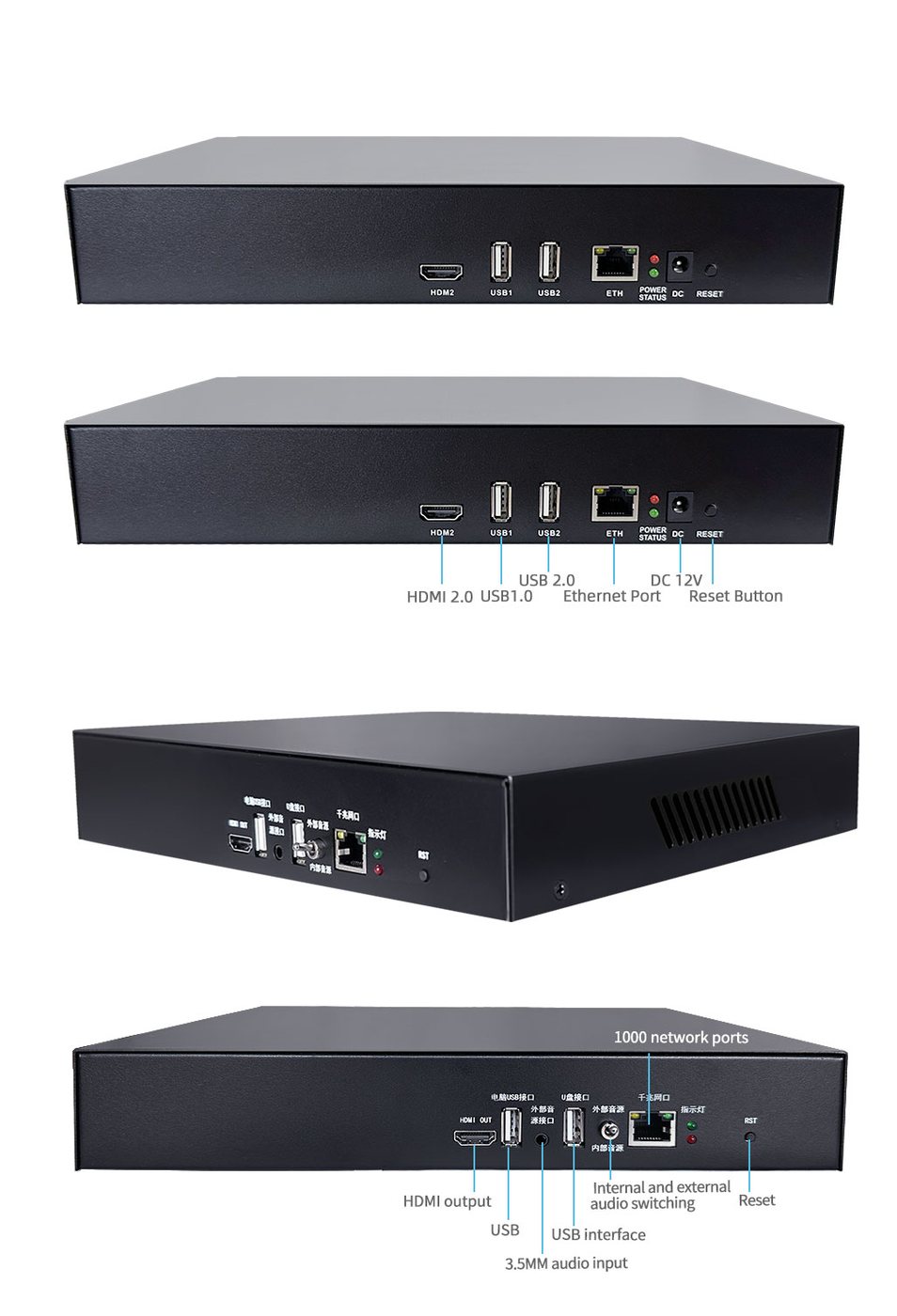
Product Images
Product Usage and Troubleshooting (Chinese Version)
In-site Docs Center
UVC Unattended Live Streaming Device Video Tutorial
UVC Unattended Live Streaming Device Simulated Camera: Live Streaming LAN Camera Feed via Kuaishou Live Companion
Device FAQ
| Question | Answer |
|---|---|
| 1、Is it a standard 1U chassis? | No |
| 2、Can the device prevent detection during unattended live streaming? | The device supports overlaying camera images, supports external 3.5mm audio, and supports a series of functions such as dynamic frame dropping. These functions provide a certain anti-detection effect. But it also has a lot to do with the live streaming content itself. Repeated video content, no people appearing in the frame, a large amount of low-quality video content, or copying other people's live streams can also trigger risk control. Therefore, we recommend that you must use high-quality and as many video materials as possible to avoid risks |
| 3、Common troubleshooting for the UVC video encoder | In-site Docs Center |
| 4、Is a computer required? Can it be done with a mobile phone? | A computer is required; both desktop and laptop computers work |
| 5、Can automatic replies be implemented? | Currently Taobao and Kuaishou can be paired with our automatic reply software to achieve automatic replies. In addition, an external audio model can be connected to support 3.5mm real-time audio interaction |
| 6、Is there interaction in the live room? | Currently Taobao and Kuaishou can be paired with our automatic reply software to achieve automatic replies. Other platforms can only interact manually |
| 7、Can the computer be used for other things during live streaming? | Yes, it does not affect it |
| 8、The USB disk is not recognized? | Check whether the USB disk is in exFAT format. Connect the USB disk to the computer, then right-click Properties to check the SD card format. If it is not exFAT, format it and select exFAT |
| 9、Can only 1 video file be placed in the USB disk? | Multiple videos are supported for random or sequential carousel, and they must be MP4 format videos |
| 10、How long can videos be stored? | A 64G USB disk is included by default, and you can also use a larger capacity USB disk |
| 11、Can video looping be implemented? | Both single video looping and multiple video looping are supported. The looping mode can be set to sequential carousel or random carousel |
| 12、Can live audio intervention be supported? | External 3.5mm audio is supported |
| 13、Does it support multiple accounts and multiple platforms? Which platforms are supported? | Currently we have tested Douyin, Kuaishou and Bilibili with no problems. Multiple platforms are supported, and 3 platforms can stream simultaneously, with no account limit. |
| 14、After connecting 3.5MM external audio, won't the sound of the video itself and the 3.5mm external audio be duplicated? | If 3.5mm external audio is connected, the sound of the video itself will be reduced by 80%, so the external audio is the main sound. |
| 15、About violation issues | Regarding video materials, you need to prepare them yourself. Our suggestion is to prepare several non-repeating videos, for example 12 videos of 2 hours each, looping for 24 hours. Of course, the more videos the better, and we recommend using high-quality videos. Do not use screen recordings of other people's live streams or frequently repeated videos |
| 16、Can it search for network cameras in the LAN? | Yes |
| 17、What is the purpose of the overlaid camera? Won't the material video be blocked if the camera image is overlaid? | The overlaid camera image is to fool the platform's detection. In the backend, you can adjust the transparency of the camera image so that viewers of the live stream cannot see the overlaid camera image |
| 18、What is included in the shipment? | The device includes the following accessories: dual-head USB cable, USB disk (64G by default), 1-meter network cable. If you purchase the version with a network camera, the camera and camera power supply are included |
| 19、Can it stream on WeChat Channels? Can it announce the time? | It can stream, but it cannot announce the time |
Didn't find what you need?Contact us,Talk to our engineers directly.