Home / Docs Center / Product Datasheets / Dual-Ethernet Analytics Box
Dual-Ethernet Analytics Box
Project: Product Datasheet | page_id: 865
| Dual Ethernet Port Smart Analytics Box | |
|---|---|
| Model | XSWTVR-60MAI19DCH |
| Network Video Input Protocol | HTTP/RTSP/RTMP/RTP/UDP-TS |
| Network Video Output Protocol | HTTP-FLV/RTSP/RTMP/UDP-TS/HLS/WS-FLV/WS-RAW/WEBRTC/ONVIF/GB28181 |
| Input Video Encoding Format | H.264/H.265 |
| CPU | Dual core 1.2G, mips architecture |
| Memory | 256MB |
| Network Interface | 10/100Mbit X2 |
| Input Audio Encoding Format | AAC/G.711/MP3/Mp2/OPUS |
| Output Video Encoding Format | H.264/H.265 |
| Output Audio Encoding Format | AAC |
| Max Network Video Channels | 19 |
| Max Total Bitrate | 60Mbit (the actual value varies by protocol and encoding format) |
| Recording | Supported |
| Remote Upgrade | Supported |
| Remote Management | Supports remote modification of device parameters and remote playback of device recordings |
| Power Supply | DC-12V |
| Operating Temperature | 0~70℃ |
Product Images
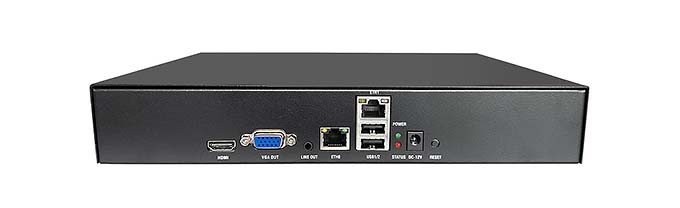
Product Manual Link (Chinese Version)
Device FAQ
| Question | Answer |
|---|---|
| 1、Can HTTP TS be converted to UDP? | Yes |
| 2、How many network segments are supported? | 2 network segments |
Introduction to Various Video Pull Protocols of the Video Encoder
Introduction to Various Video Protocol Outputs of the Video Encoder
Introduction to Video Encoder Status Overview and Channel Settings (includes how to add cameras)
Introduction to the Scheduled Streaming Function of the Video Encoder
Introduction to Advanced Network Settings of the Video Encoder
Introduction to Video Encoder Recording, Scheduled Recording, Recording Playback and Download
Introduction to Video Encoder Audio Settings
Introduction to the Split-Screen Live Streaming Function of the Video Encoder
Introduction to the Quick LAN Video Playback Method
Introduction to Video Encoder Backup and Restore
Video Encoder Serial Port Passthrough and GPS File Download
Didn't find what you need?Contact us,Talk to our engineers directly.