Home / Docs Center / Product Datasheets / 20-Channel Video Encoder
20-Channel Video Encoder
Project: Product Datasheet | page_id: 147
| 20-channel Video Encoder | |
|---|---|
| Model | XSWTVR-40M20CH |
| Network Device Discovery | ONVIF |
| Network Video Input Protocol | HTTP/RTSP/RTMP/RTMPS/RTP/UDP-TS |
| Network Video Output Protocol | HTTP-FLV/RTSP/RTMP/UDP-TS/HLS/WS-FLV/WS-RAW/ONVIF/WEBRTC/GB28181 |
| Input Video Encoding Format | H.264/H.265 |
| Input Audio Encoding Format | AAC/G.711 |
| Output Video Encoding Format | H.264/H.265 |
| Output Audio Encoding Format | AAC |
| Max Network Video Channels | 20 |
| Max Total Bitrate | 40Mbit (the actual value varies with the protocol and encoding format) |
| Recording | Supports 1 x 16TB hard disk |
| Remote Upgrade | Supported |
| Remote Management | Supports remote modification of device parameters and remote playback of device recordings |
| Dimensions | 270x216x45mm |
| Weight | 1051g |
| Power Supply | DC-12V |
| Operating Temperature | 0~70℃ |
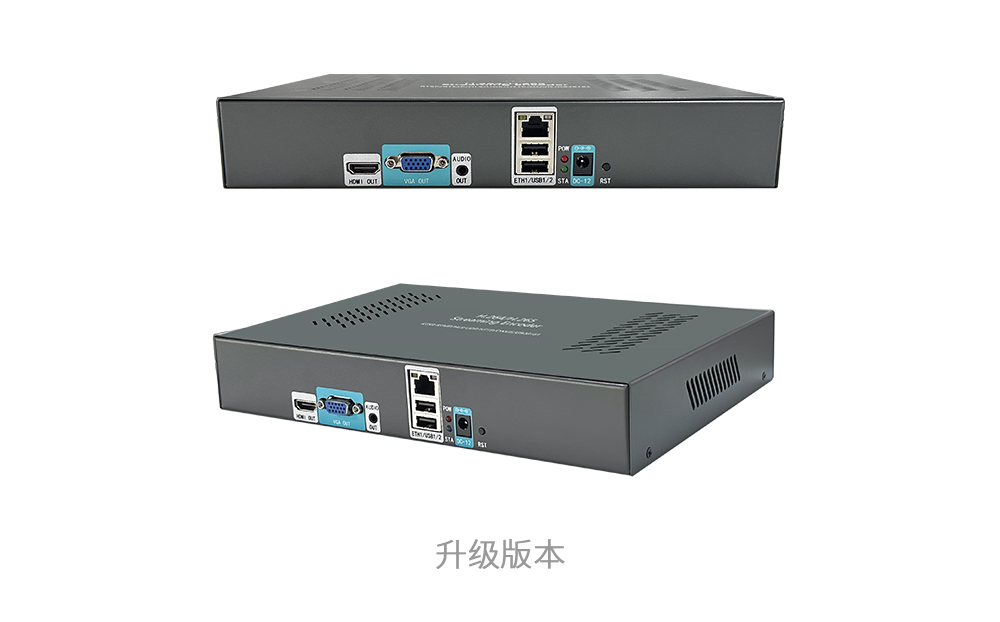
Product Images
Product Manual Link (Chinese)
In-site Docs Center
Video Encoder FAQ and Troubleshooting
In-site Docs Center
Device FAQ
| Question | Answer |
|---|---|
| 1. There is a 5-second delay on the LAN. The delay is too large; how can it be improved? | The device itself has no delay; the delay is mainly caused by the player. Using a low-latency player will be better. |
| 2. Is the signal source an HDMI signal or IP decoding? | It is a network video source. |
| 3. Can the output combine any two signals into picture-in-picture? | Picture-in-picture is not supported at present; only top-bottom or left-right mode is available. If you need more, picture-in-picture mode can be customized. |
| 4. How large is the memory of this model? Is it also an Ingenic chip? | Yes, it is an Ingenic chip. The 20-channel model has 256 MB memory, the 10-channel has 128 MB and the 40-channel has 4 GB. |
| 5. Which ports need to be mapped for port mapping? | 80, 1935 |
| 6. Are the multiple players of the cloud platform free or paid? | The players are free. |
| 7. Does the live streaming box support 4K? Can the resolution be customized? | 4K is supported. The resolution is not defined by our device, but by the video source itself. |
| 8. Can it be called remotely via API? | Yes. Video encoder API documentation: doc-258.html |
| 9. What format are the recorded videos downloaded in? | TS format |
| 10. Can it be connected to an NVR? | It can pull streams from an NVR. |
| 11. What does maximum total bandwidth mean? | Maximum bandwidth refers to the maximum total bitrate it can handle; exceeding it will not work. |
| 12. How many clients can access at the same time, and how is it calculated? | It depends on the video source. The output bitrate equals the input bitrate; multiply it by the number of concurrent viewers. The total bitrate must not exceed the total bandwidth of the device. |
| 13. Which cloud platforms are supported? | Any cloud platform that can provide an RTMP streaming address can be streamed to. |
| 14. What operating system does the platform use? | Linux |
| 15. What is the difference between a video encoder and a streaming server? How do I choose? | A video encoder can only receive streams in a simple way and cannot manage them; a streaming server can define its own streaming addresses and manage them. Choose according to your concurrency requirements. |
| 16. Is multicast supported? | Yes. |
| 17. Can it be connected to an aggregated router? | Yes. |
| 18. What is the LAN delay? | On a LAN, the delay is generally less than 1 frame. In practice, the delay is mainly determined by the player. Common Flash players playing RTMP have a delay of about 1 to 3 seconds. The reference delays for playing various video source outputs in a browser are as follows: HLS: 5~15S WS-RAM/WS-FLV/HTTP-FLV: 500ms~3S rtmp: 1~3S Using PC software, the delays of our low-latency player are: HLS: 4~10S WS-RAW/WS-FLV/HTTP-FLV/RTMP: 80ms~200ms WEBRTC: 100~300ms Our 20-channel and above video encoders support webrtc. |
| 19. Is there a recommended player? | You can download this player and try it: http://192.168.0.250:5000/share.cgi?ssid=5c937d6eac5e45d8926de84af6c6e36b After double-clicking to run it, press ESC, then enter the video source address in the address bar and click open file. |
| 20. About live streaming playback over the Internet? | If the video encoder has a public IP or port mapping can be configured, the video encoder can directly output http-flv, hls (m3u8), ws-flv, ws-raw and rtmp; if there is no public IP, a public server is needed for relaying. The server output supports http-flv and hls (m3u8). This mode requires a traffic fee of 0.4 RMB/GB. About the public network traffic fee for using the XSTRIVE streaming platform (no traffic fee for LAN use) |
| 21. What is the HLS segment duration? Can it be modified? | The default is 1S and cannot be modified; modification requires customization. |
| 22. Does the device support PoE power supply for cameras? | Not supported. |
| 23. What is the rated power? | Within 5W. |
| 24. What protocol is used to play back recordings? | FLV |
| 25. Are recordings cleaned up automatically? What is the cleanup rule? | Based on the disk size, automatic cleanup starts when disk usage reaches 98%, starting from the oldest recordings. Generally four hours of recordings are cleaned at a time; recording and cleanup happen at the same time, keeping disk space at about 2%. |
Video Encoder Product UI_Channel Settings
Video Encoder Network Configuration_Recording Playback
Video Encoder. Password Change_API Authentication
Video Encoder webrtc_Login Configuration
Introduction to Various Video Pull Protocols of the Video Encoder
Introduction to Various Video Protocol Outputs of the Video Encoder
Video Encoder Status Overview and Channel Settings (including how to add a camera)
Introduction to the Video Encoder Scheduled Streaming Function
Introduction to Video Encoder Advanced Network Settings
Introduction to Video Encoder Recording, Scheduled Recording, Recording Playback and Download
Introduction to Video Encoder Audio Settings
Introduction to the Video Encoder Multi-screen Live Function
Introduction to Quick LAN Video Playback
Introduction to Video Encoder Backup and Restore
Video Encoder Serial Port Transparent Transmission and GPS File Download
Didn't find what you need?Contact us,Talk to our engineers directly.