Home / Docs Center / Product Datasheets / 26-Channel (4K Transcoding) Encoder
26-Channel (4K Transcoding) Encoder
Project: Product Datasheet | page_id: 856
| 26-Channel (4K Transcoding) Video Encoder | |
|---|---|
| Model | XSWTVR-80M4KCH/EL |
| Network Device Discovery | ONVIF |
| Video Input | 26-channel network streams/video file input, supports custom carousel, carousel time configurable |
| Audio Input | Supports separate audio source, random audio playback, audio list playback |
| Picture Merging | Supports 2-picture and 3-picture horizontal/vertical merging, supports 1/2/3/4/9-channel video merging |
| Image Overlay | Supports PNG image overlay and GIF overlay |
| Video Transcoding Capability | 4 channels of 1080p@30fps or 8 channels of 720p@30fps; can change resolution, lower bitrate and raise bitrate |
| Network Interface | Gigabit Ethernet interface |
| Expansion Interface | SATA 3.0 (up to 16TB supported) |
| Network Video Output Protocol | SRT/RTSP/RTMP/UDP-TS/HLS/WS-FLV/WS-RAW/WEBRTC/GB28181 client/ONVIF |
| Output Video Encoding Format | H.264/H.265 |
| Output Audio Encoding Format | AAC |
| Max Network Video Channels | 26 |
| Max Total Bitrate | 80Mbit (the actual value varies by protocol and encoding format) |
| Video Encoding Bitrate | 35Kbps~80Mbit |
| Remote Upgrade | Supported |
| Remote Management | Supports remote modification of device parameters. Register at platform.xstrive.com to use |
| Power Supply | DC 12V |
| Operating Temperature | 0~70℃ |
| Dimensions | 270x216x45mm |
| Weight | 1055g |
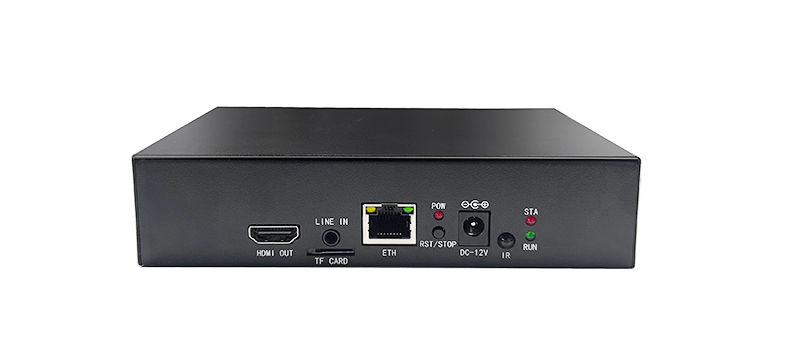
Product Images
Product Manual Link (Chinese Version)
In-site Docs Center
Video Encoder FAQ and Troubleshooting
In-site Docs Center
Device FAQ
| Question | Answer |
|---|---|
| 1、Does transcoding mean changing the resolution? | Yes, and H.264 and H.265 can also be converted to each other |
| 2、Besides RTMP, can the output be multicast? | Multicast output is supported, in the advanced settings |
| 3、Can multiple video channels be merged into one output? | Yes, 4 channels of video can be merged into 1 output |
| 4、How to merge 1 to 4 channels into a quad-view picture and then stream it? | First pull streams on the first four channels. The first four channels support 4 channels of 1080P30 or 1 channel of 4K30 or 2 channels of 2K30. Set the camera resolution to 1080, enable transcoding in Advanced, and after the four channels are configured, the fifth channel will automatically merge into a quad view |
| 5、When fully loaded, how many transcoding streams can be handled? | 4 channels of 1080P transcoding are supported |
| 6、Can the transcoding encoding format be customized? We have our own encoding, not h264/h265 | Only h264 or h265; other custom encodings are not supported |
| 7、Is ffmpeg invocation supported? | Yes, supported |
| 8、What type is the mainboard? ARM or AMD/Intel | ARM |
| 9、Can automatic carousel be implemented? | Not currently; this function can be customized |
| 10、Can H.264 be transcoded to H.265? Can the bitrate be kept consistent before and after transcoding? | Yes, H.264 and H.265 can be converted to each other. The bitrate can be kept consistent before and after transcoding |
| 11、Is local video transcoding supported? | Yes, supported |
| 12、What resolution input does transcoding support? | If not transcoding, the input resolution is not limited. If transcoding is needed: 8 channels of 720P, or 4 channels of 1080P30, or 1 channel of 4K30, or 2 channels of 2K30 |
| 13、After transcoding compression, can the bandwidth be compressed to within 1Mbit? | Yes |
| 14、Is the picture previewed on the transcoding channel the one before or after encoding? | After encoding |
| 15、 |
Video Encoder Product Interface_Channel Settings
Video Encoder Network Configuration_Recording Playback
Video Encoder. Password Modification_API Authentication
Video Encoder WebRTC_Login Configuration
Introduction to Various Video Pull Protocols of the Video Encoder
Introduction to Various Video Protocol Outputs of the Video Encoder
Introduction to Video Encoder Status Overview and Channel Settings (includes how to add cameras)
Introduction to the Scheduled Streaming Function of the Video Encoder
Introduction to Advanced Network Settings of the Video Encoder
Introduction to Video Encoder Recording, Scheduled Recording, Recording Playback and Download
Introduction to Video Encoder Audio Settings
Introduction to the Split-Screen Live Streaming Function of the Video Encoder
Introduction to the Quick LAN Video Playback Method
Introduction to Video Encoder Backup and Restore
Video Encoder Serial Port Passthrough and GPS File Download
Didn't find what you need?Contact us,Talk to our engineers directly.