Home / Docs Center / Product Datasheets / 32-Channel Video Encoder
32-Channel Video Encoder
Project: Product Datasheet | page_id: 150
| 32-channel Video Encoder | |
|---|---|
| Model | XSWTVR-50M32CH |
| Network Device Discovery | ONVIF |
| Network Video Input Protocol | HTTP/RTSP/RTMP/RTP/UDP-TS |
| Network Video Output Protocol | HTTP-FLV/RTSP/RTMP/UDP-TS/HLS/WS-FLV/WS-RAW/WEBRTC/ONVIF/GB28181 |
| Input Video Encoding Format | H.264/H.265 |
| Input Audio Encoding Format | AAC/G.711/MP3/Mp2/OPUS |
| Output Video Encoding Format | H.264/H.265 |
| Output Audio Encoding Format | AAC |
| Max Network Video Channels | 32 |
| Max Total Bitrate | 50Mbit (the actual value varies with the protocol and encoding format) |
| Recording | Supports 1 hard disk up to 16T |
| Remote Upgrade | Supported |
| Remote Management | Supports remote modification of device parameters and remote playback of device recordings |
| Dimensions | 270x216x45mm |
| Weight | 1051g |
| Power Supply | DC-12V |
| Operating Temperature | 0~70℃ |
Product Images
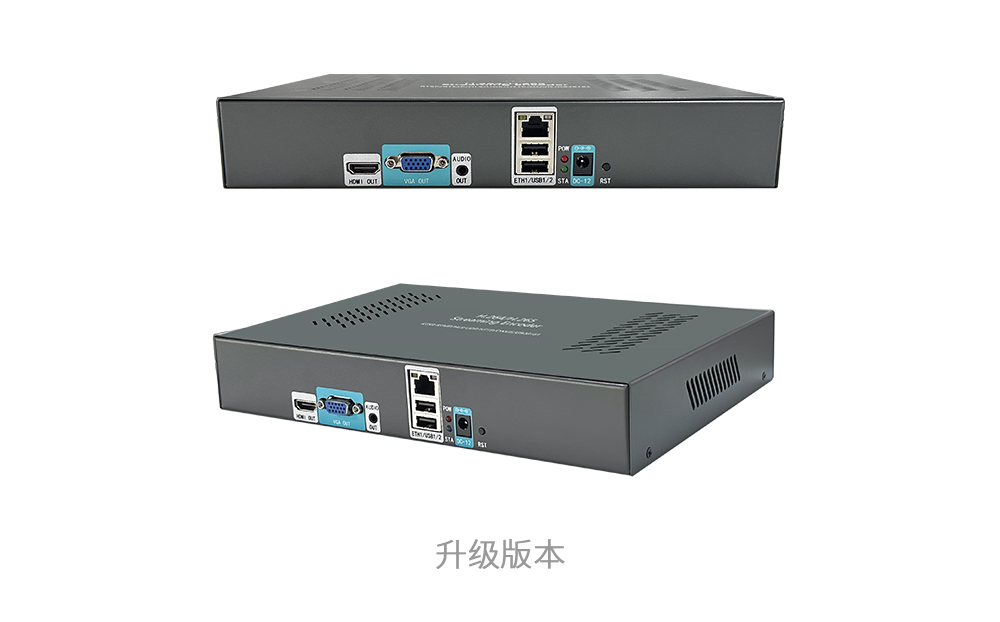
Product Manual (Chinese)
In-site Docs Center
Video Encoder FAQ and Troubleshooting
In-site Docs Center
Device FAQ
| Question | Answer |
|---|---|
| 1. Does multi-screen live support polling and rotation playback? | Multi-screen live does not support polling or rotation playback. |
| 2. Is there an API to get camera snapshots? | Yes. For API calls, refer to the API documentation. Video encoder API documentation: doc-258.html |
| 3. Is the Ethernet port 100M or gigabit? | Gigabit Ethernet. |
| 4. How large is the device latency? | The device itself has almost no latency; the latency mainly depends on the player. |
| 5. Can it transmit over the public network? I want to transmit programs received by a set-top box in my rural hometown to the city to watch. What software does the back-end receiver need? | Yes, an H5 web page or mini program is enough. |
| 6. Are the network speed requirements high? | It depends on the bitrate of your camera. |
| 7. The description says recording playback is supported? | Yes, a hard disk must be installed to enable playback. |
| 8. Can surveillance video be viewed in real time through a link in a WebRTC online player? | Yes. |
| 9. Is there a traffic fee for streaming? Is it a permanent service? Are there other charges? | Whether streaming to a platform is charged depends on the platform. There is no fee on a LAN. For streaming to the public network, it depends on which platform you stream to. If you use our platform, it is 0.4 RMB/GB. |
| 10. Can background music be added to the live stream? How? | Yes. Buy the version with a hard disk and upload the audio directly to the internal hard disk. AAC format audio files are supported. |
| 11. How can the recordings saved by the video encoder be retrieved? | Currently you can only log in to the device to download them or call the SDK. |
| 12. When pushing video stored on the hard disk as the video source, can it be played in a loop? | Yes. |
| 13. What is the RTSP port number? | RTSP port is 554, RTMP port is 1935, HTTPS port is 443 and HTTP port is 80. |
Video Encoder Product UI_Channel Settings
Video Encoder Network Configuration_Recording Playback
Video Encoder. Password Change_API Authentication
Video Encoder webrtc_Login Configuration
Introduction to Various Video Pull Protocols of the Video Encoder
Introduction to Various Video Protocol Outputs of the Video Encoder
Video Encoder Status Overview and Channel Settings (including how to add a camera)
Introduction to the Video Encoder Scheduled Streaming Function
Introduction to Video Encoder Advanced Network Settings
Introduction to Video Encoder Recording, Scheduled Recording, Recording Playback and Download
Introduction to Video Encoder Audio Settings
Introduction to the Video Encoder Multi-screen Live Function
Introduction to Quick LAN Video Playback
Introduction to Video Encoder Backup and Restore
Video Encoder Serial Port Transparent Transmission and GPS File Download
Didn't find what you need?Contact us,Talk to our engineers directly.