Home / Docs Center / Product Datasheets / 16-Channel Encoder with Audio
16-Channel Encoder with Audio
Project: Product Datasheet | page_id: 413
| 16-Channel Video Encoder with Analog Audio | |
|---|---|
| Model | XSWTVR-30M16ACH |
| Network Device Discovery | ONVIF |
| Network Video Input Protocol | RTSP/RTMP/RTP/UDP-TS/HTTP-FLV |
| Network Video Output Protocol | HTTP-FLV/RTSP/RTMP/WS-FLV/WS-RAW/ONVIF/GB28181 |
| Input Video Encoding Format | H.264/H265 |
| Max Input Resolution | 1080P |
| Audio Input Protocol | RTSP/RTMP/RTP/UDP-TS/HTTP-FLV/3.5mm LINE IN input |
| Input Audio Encoding Format | AAC/G.711/MP3/MP2/AC3 |
| Output Video Encoding Format | H.264/H265 |
| Output Audio Encoding Format | AAC |
| Max Network Video Channels | 16 |
| Max Total Bitrate | 30Mbit (the actual value varies by protocol and encoding format) |
| Network | 1-channel 100Mbit Ethernet |
| Recording | Supports 1 TF card of up to 512G |
| Remote Upgrade | Supported |
| Remote Management | Supports remote modification of device parameters and remote playback of device recordings |
| Dimensions | 270x215x44mm |
| Weight | 1027g |
| Power Supply | DC-12V |
| Operating Temperature | 0~70℃ |
Product Images


Product Manual Link (Chinese Version)
In-site Docs Center
Click here to watch the device usage video introduction
Video Encoder FAQ and Troubleshooting
In-site Docs Center
Device FAQ
| Question | Answer |
|---|---|
| 1,Can it record remotely? | Yes, remote recording is possible, but it needs to be relayed through our streaming server and traffic fees are charged |
| 2、Can the software logo be changed or removed? | It can be removed; we provide a neutral version |
| 3、Can the device convert an RTSP stream to an HLS stream? | Yes |
| 4、Does "transcoding not supported" in the page selection table mean that HLS input cannot be output as RTMP? | No. It means that changing the video size is not supported; protocol conversion is supported |
| 5、Does the device come with a hard disk or does the hard disk need to be purchased separately? | It needs to be purchased separately. The hard disk can be purchased together with the device and is sold in our store. Hard disk link: https://item.taobao.com/item.htm?id=684974261789 |
| 6、A private kindergarten wants parents to view classroom monitoring. Please introduce the solution, maintenance and costs | Parent viewing is billed by traffic at 0.4 CNY/GB. Only one video encoder needs to be installed. Management mini programs are provided for agents, teachers and parents. For details, see the XSTRIVE Kindergarten System Management User Guide: docs.html |
| 7、Does the device directly support secondary development? Is there corresponding secondary development documentation? | Yes. HTTP API documentation is provided. Video encoder API documentation: doc-258.html |
| 8、Are traffic fees required when accessing cameras from the external network? | When accessing from the external network, traffic fees are required if it is relayed through our server. For traffic calculation, refer to the bitrate and traffic comparison table: docs.html |
| 9、Can it receive one RTSP stream and output one RTSP stream and one RTMP stream? | Yes, one input and two outputs |
| 10、With one RTSP and one RTMP output, how large is the latency of the RTSP output? | Less than one frame, less than 50ms |
| 11、How is on-demand streaming implemented? Does your device have an API for it? | Using our cloud platform, on-demand streaming can be implemented automatically |
| 12、How do I download the device search tool? | Device search tool Chinese and English version download URL: https://www.xstrive.com/download/ |
| 13、My computer has no discrete graphics card and a very low-end CPU. Transcoding to RTMP and streaming causes high resource usage and screen artifacts. Buying this is the right choice, right? | Yes, that's right |
| 14、Cameras have been installed at a construction site and connected to a DVR. A web model of the site has been built and each camera's video needs to be playable on the web page. Can this device be used? | Yes |
| 15、What is the recognition frame rate at 4K? | There is no 4K model in stock at present. The recognized images are all scaled to a resolution of 640x480 |
| 16、Have you measured the latency of RTSP to RTMP on the device? | The latency is 30ms |
| 17、Can a Xiaomi surveillance camera be used? | Yes, any camera accessible via RTSP can be used |
| 18、Can this streaming device control cameras? | The video encoder web backend can control camera rotation through ONVIF |
| 19、The audio timeout is 10s. If the stream cannot be pulled within 10s, will streaming stop? Or will only the video stream be pushed if it cannot be pulled within 10s? | The entire streaming will be interrupted and all pulling will restart |
| 20、Can it be linked to a WeChat official account? | Yes, but traffic fees apply, 0.4 CNY/GB |
| 21、Is there a way to configure a device remotely when it is not on-site? The device has no external IP, how can it be accessed? Will the configuration information be recorded? | All video encoders can be configured remotely; it needs to be relayed through our server; the server does not record configuration information |
| 22、Can the video encoder push RTSP streams to SRS? | Yes |
| 23、Is historical streaming supported? | Historical streaming is not supported, but web remote playback is supported |
| 24、Is simultaneous access from multiple terminals supported? | Yes, but the number of terminals is limited. Devices with a higher total bitrate support more terminals |
| 25、Can factory monitoring be networked to a provincial platform? Using the 28181 protocol | Yes, supported |
| 26、Does it have server functionality? | It has server functionality, but the number of concurrent connections supported is limited. For high concurrency, a streaming server is recommended |
| 27、Does the storage function need to be added separately? | Yes, an SD card or hard disk needs to be added separately. Hard disk purchase link: https://item.taobao.com/item.htm?id=684974261789&spm=a8919.3000000002019401.0.1 |
| 28、The video encoder supports H5 playback. Does this refer to the local side, or can users pull the stream back from the external network to watch? | Both local and external network work, as long as the IP is reachable |
| 28、How do I get the push address? | The push address depends on the platform you are pushing to and you need to obtain it yourself. We do not provide push addresses. Here are two online references for obtaining push addresses: https://www.modou.tv/?p=718 and https://www.modou.tv/?p=2134 |
| 29、Quick playback address in the LAN? | Channel 1 http://192.168.0.15/open/live-play/?a=1 ; Channel 2 http://192.168.0.15/open/live-play/?a=2 ;Channel 3 http://192.168.0.15/open/live-play/?a=3 ; ...the IP needs to be changed to your own device IP. a=1 means channel 1, a=2 means channel 2, and so on |
| 30、Can streaming be done over HTTP? | No, streaming can only be done via RTMP. The HTTP protocol can only be used for pulling streams |
| 31、WebRTC playback address | Method reference: docs.html |
| 32、What are the web and RTMP ports? | Web port 80, RTMP port 1935, RTSP is 554 |
| 33、Is there an automatic reconnect function after stream interruption? | Yes |
| 34、Can this device run Python scripts? | No |
| 35、Can this kind of repeater upload video to an environmental protection platform through broadband configuration of a DVR? | Yes, as long as the environmental protection platform can provide a national standard access code |
| 36、What if I forget the device login password? | You can reset the password on the cloud platform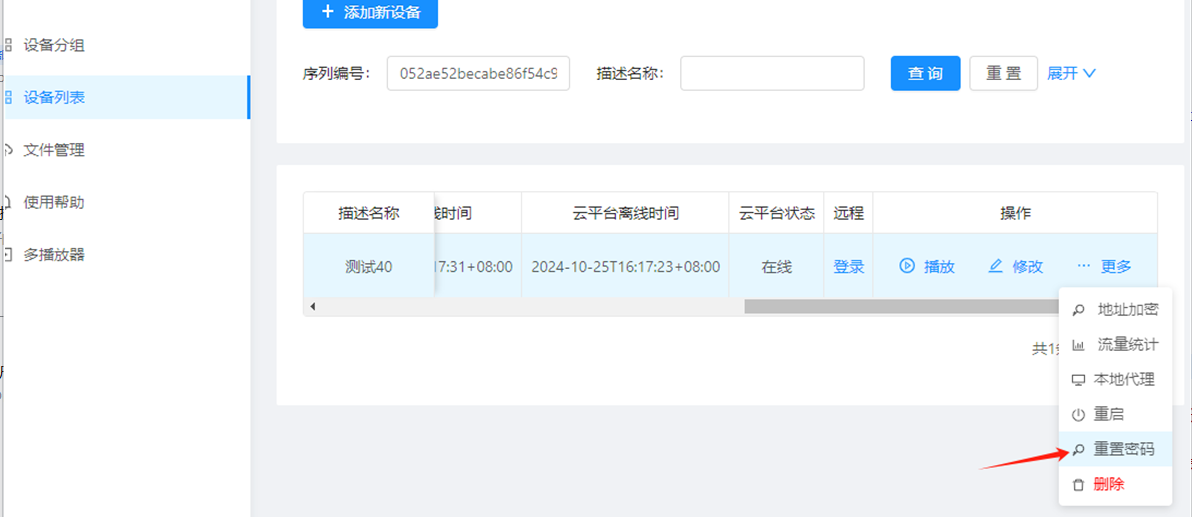 |
Video Encoder Product Interface_Channel Settings
Video Encoder Network Configuration_Recording Playback
Video Encoder. Password Modification_API Authentication
Introduction to R16 External Audio Settings
Video Encoder WebRTC_Login Configuration
Introduction to Various Video Pull Protocols of the Video Encoder
Introduction to Various Video Protocol Outputs of the Video Encoder
Introduction to Video Encoder Status Overview and Channel Settings (includes how to add cameras)
Introduction to the Scheduled Streaming Function of the Video Encoder
Introduction to Advanced Network Settings of the Video Encoder
Introduction to Video Encoder Recording, Scheduled Recording, Recording Playback and Download
Introduction to Video Encoder Audio Settings
Introduction to the Split-Screen Live Streaming Function of the Video Encoder
Introduction to the Quick LAN Video Playback Method
Introduction to Video Encoder Backup and Restore
Video Encoder Serial Port Passthrough and GPS File Download
Didn't find what you need?Contact us,Talk to our engineers directly.