Home / Docs Center / Product Datasheets / 33-Channel Dual-Ethernet Encoder (New)
33-Channel Dual-Ethernet Encoder (New)
Project: Product Specification | page_id: 1196
| 33-Channel (Dual Gigabit Network Port) Pusher | |
|---|---|
| Model | XSWTVR-200M33DCH |
| Network Device Discovery | ONVIF |
| Network Video Input Protocol | HTTP/RTSP/RTMP/RTP/UDP-TS |
| Network Video Output Protocol | HTTP-FLV/RTSP/RTMP/UDP-TS/HLS/WS-FLV/WS-RAW/WEBRTC/ONVIF/GB28181 |
| Input Video Encoding Format | H.264/H.265 |
| CPU | Quad-core A55 2G, arm architecture |
| Memory | 2GB |
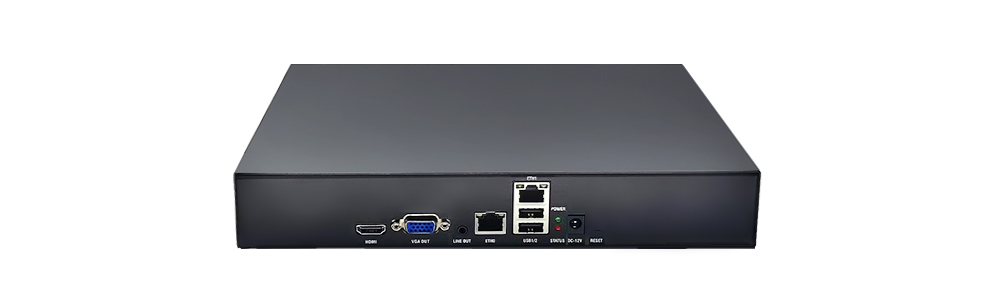
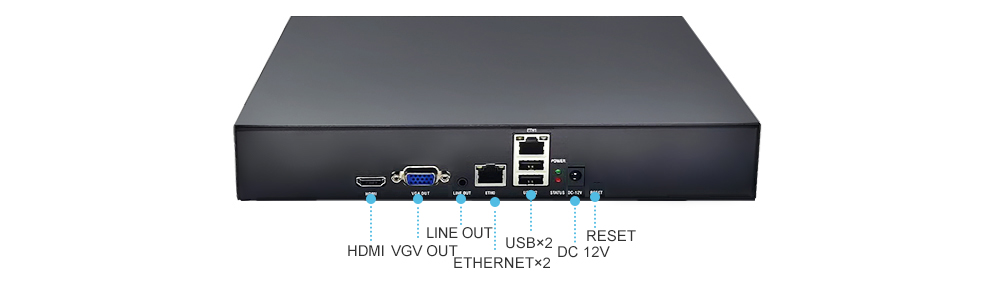
| Network Interface | 10/100/1000Mbit X2 |
| Input Audio Encoding Format | AAC/G.711/MP3/Mp2/OPUS |
| Output Video Encoding Format | H.264/H.265 |
| Output Audio Encoding Format | AAC |
| Max Network Video Channels | 33 |
| Max Total Bitrate | 200Mbit (the actual value varies with different protocols and encoding formats) |
| Recording | Supports 1 hard disk of up to 16T |
| Remote Upgrade | Supported |
| Remote Management | Supports remote modification of device parameters and remote playback of device recordings |
| Dimensions | 270x216x45mm |
| Weight | 1051g |
| Power Supply | DC-12V |
| Operating Temperature | 0~70℃ |
Product Images
Product Manual Link (Chinese Version)
In-site Docs Center
Pusher FAQ and Troubleshooting
In-site Docs Center
FAQ
| Question | Answer |
|---|---|
| 1. Can HTTP TS be converted to UDP? | Yes |
| 2. How many network segments are supported? | 2 network segments |
| 3. Is automatic timed signal switching supported? For example, with 3 input signals, automatically switching to the next input signal every 60 seconds? | Yes |
| 4. For network port 0 and network port 1, which is the internal network port and which is the external network port? | eth0 is the external network port and eth1 is the internal network port; the IP of eth0 can be found directly with the search tool. If the device and the computer are connected to the same network, you can use the search tool directly |
| 5. What power is required for the pusher? Is a hard disk built in? | 12V 2A. There is no built-in hard disk; the hard disk of all devices needs to be added separately. The hard disk uses SATA and 4-pin power supply |
Pusher Product Interface - Channel Settings
Pusher Network Configuration - Recording Playback
Pusher - Password Modification - Interface Authentication
Pusher WebRTC - Login Configuration
Introduction to Various Video Pull Protocols of the Pusher
Introduction to Various Video Protocol Outputs of the Pusher
Pusher Status Overview and Channel Settings (Including How to Add a Camera)
Introduction to the Pusher Scheduled Push Function
Introduction to Pusher Advanced Network Settings
Introduction to Pusher Recording, Scheduled Recording, Recording Playback and Download
Introduction to Pusher Audio Settings
Introduction to the Pusher Split-Screen Live Streaming Function
Introduction to the Method of Quickly Playing Video on a LAN
Introduction to Pusher Backup and Restore
Pusher Serial Port Passthrough and GPS File Download
Didn't find what you need?Contact us,Talk to our engineers directly.