Home / Docs Center / Product Datasheets / HGC2-2MP 2MP IP Camera Datasheet
HGC2-2MP 2MP IP Camera Datasheet
Project: Product Specification | page_id: 1681
| 2MP Camera | |||
|---|---|---|---|
| Camera | Main Chip | HiSilicon hi3516ev200 | |
| Sensor Type | GC4653 1/2.9'' CMOS Solid-state Image Sensor | ||
| Lens | 2.8mm~6mm: F1.6 horizontal field of view 79°~51° | ||
| Minimum Illumination | Color: 0.01 Lux@(F1.2,AGC ON); Black and white: 0.03Lux @(F1.2,AGC ON),0 Lux with IR | ||
| Lens Interface Type | M20 | ||
| Shutter | 1 second to 1/100.000 second | ||
| Day/Night Switching Mode | ICR infrared filter type | ||
| Video Processing | 3A(AE,AF,and AWB)funciton | ||
| Compression Standard | Video Compression Standard | H.264 /H.264 /MJPEG | |
| H.265 Encoding Type | Main Profile | ||
| H.264 Encoding Type | BaseLine Profile /Main Profil /High Profile | ||
| Video Compression Bitrate | 32Kbps~8Mbps | ||
| Image | Max Image Size | 1920x1980 | |
| Main Stream Resolution and Frame Rate | 1920x1080@30hz,1280x720@60hz | ||
| Sub Stream Resolution and Frame Rate | 704x480@60hz 640x480@60hz | ||
| Highlight Suppression | Supported | ||
| Day/Night Switching Method | Day, Night, Auto | ||
| Network Functions | Interface Protocol | ONVIF/GB28181 | |
| Security Protocol | Password protection | ||
| Network Protocol | TCP/IP,HTTP,FTP,DHCP,DNS,RTP,RTSP,RTMP | ||
| Remote Management | Supports remote web management | ||
| Storage Function | Supports up to standard Micro SD/Micro SDHC(128G) local storage | ||
| Interfaces | Communication Interface | 1 10M/100M adaptive RJ45 Ethernet port | |
| Audio Interface | 1 pair of audio input and output (1-channel line in/out) | ||
| General Specifications | Power Supply | DC12V | |
| Operating Temperature | -20℃~80℃ | ||
| Operating Humidity | Humidity less than 95% (non-condensing) | ||
| Protection Level | IP66 | ||
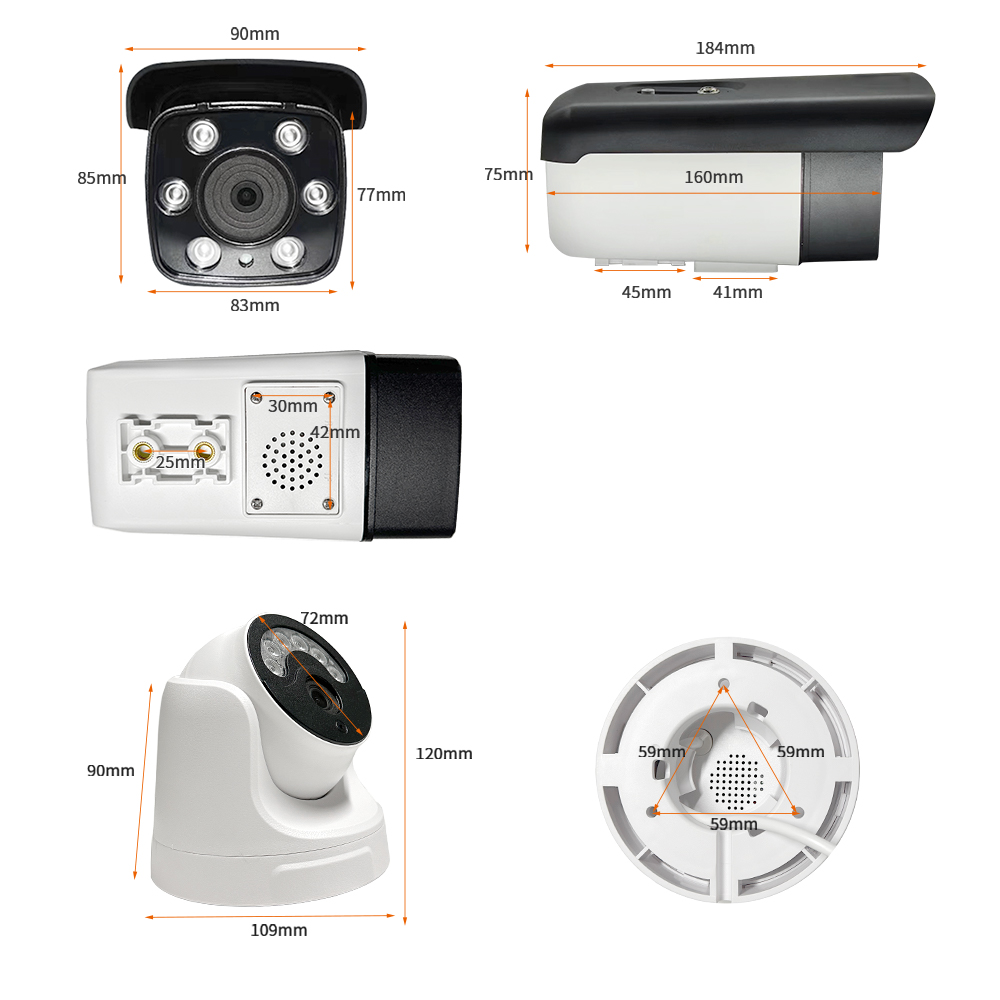
| Dimensions (mm) | Bullet: 83x76x159 Dome: 117x100 | ||
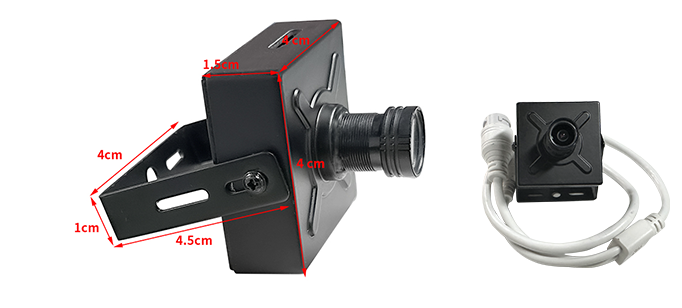
| Weight | Bullet: 370g Dome: 230g Small housing: 53g |
Product Images
Product Manual Link (Chinese Version)
In-site Docs Center
Camera First Use Guide (Chinese Version)
Installation Guide (Front).pdf
Camera FAQ and Troubleshooting
In-site Docs Center
Camera 4G Card Insertion Method
Bullet Camera Memory Card Insertion Method
Dome Camera Memory Card Installation Method
Camera FAQ
| Question | Answer |
|---|---|
| 1. Does the camera support secondary development? Is there a development document? | Yes, secondary development based on http interfaces is supported. Camera interface document: In-site Docs Center) Note: the 1080P camera only supports the old HTTP interface In-site Docs Center and the 1080P camera does not support upgrades |
| 2. How does the camera push streams to a self-built server? | The server must first generate an rtmp push address |
| 3. Is it compatible with Hikvision or Dahua NVRs? | Yes |
| 4. Does it support motion detection alarms? We need to remotely call the SDK on the server to obtain motion detection alarm data | Currently it is not supported; only remote video retrieval is supported |
| 5. What is the resolution of 2MP? Can it be adjusted? | The main stream is 1920x1080. The resolution can be adjusted downward |
| 6. What is the power consumption of the camera? How long can a 30000mAH battery keep it running? | The power consumption is about 12V 100mA, and it can run for about 30 hours |
| 7. Can it take photos on a schedule and upload them to a cloud server, for example, automatically uploading one image per minute? | Customization is required |
| 8. Is the camera system Android or Linux? | Linux |
| 9. Does the camera have a Bluetooth interface? | The 2MP model cannot be equipped with a Bluetooth module |
| 10. Is voice call software provided? | The 2MP model does not support calls; no software is needed to make calls, buy a 4MP camera that supports intercom, and you can just open the web page |
| 11. Can recording be enabled and disabled remotely? | Yes, you need to use our cloud platform for remote management, and there will be traffic fees |
| 12. Is there photo capture control? | There is no photo capture control, but there is a snapshot function |
| 13. The camera image is upside down. Where can I adjust it in the backend? | In Settings, use image rotation and choose whichever image orientation is correct |
| 14. Does it support 24-hour recording? How many days can it record at most? Will the recordings be cleared automatically when full? | 24-hour recording is supported. How many days it can record depends on the size of the memory card purchased for the camera. When it is full, the recordings will be cleared; it is loop recording |
| 15. Do the 4G and WiFi versions support wired network? | Yes (Note: the 2MP model only has a wired version, with no 4G and WiFi versions; if you need 4G and WiFi, please buy cameras with other resolutions) |
| 16. Does the 4G version also support WiFi at the same time? | No, you can only choose one of 4G and WiFi (the SIM card only supports 4G, not 5G; WiFi only supports 2.4G, not 5G) Note: the 2MP model has no 4G and WiFi versions, only the wired version |
| 17. What are the requirements for my own server if pushing streams directly to it? | It must support the rtmp protocol |
| 18. Do 4G cameras support APN cards? | APN cards are not supported; only ordinary unrestricted cards are supported. Note: the 2MP camera has no 4G version |
| 19. Can it push streams to a locally deployed streaming media server? | Yes |
| 20. Is the power interface DC5.5-2.1? | Yes |
| 21. Are the extra interfaces on the board available? Is IO still available? | There is TTL and there is IO |
| 22. Is there complete sample code for secondary development? How can I get the js code? | Android sample code can be provided; for the js interface call sample code, you can open the web page https://[device IP:9001/ with Chrome and right-click to select View Source to obtain it |
| 23. Points to note for the 1080P camera | The 1080P camera does not support the new http interface, only the old interface, and the 1080P camera uses the old UI interface and does not support upgrades |
| 24. Do you have your own cloud service platform? | Yes; XSTRIVE Device Management Platform registration address: http://platform.xstrive.com/ ; Device Management Platform user guide: In-site Docs Center |
Didn't find what you need?Contact us,Talk to our engineers directly.