Home / Docs Center / Device User Guides / Intranet Time Sync
Intranet Time Sync
Project: Device User Guide | page_id: 475
Software download address
http://download.xstrive.com/down-site/ntp/timeres.rar
I. Run directly
linux: ./time-res-linux
windows: ./time-res-win.exe
Default port: 9090
Username and password authentication is disabled by default
When used as a resource service, the current folder is used by default
II. Run with a specified port
linux: ./time-res-linux -p 9090
windows: ./time-res-win.exe -p 9090
-p service port
III. Device Configuration
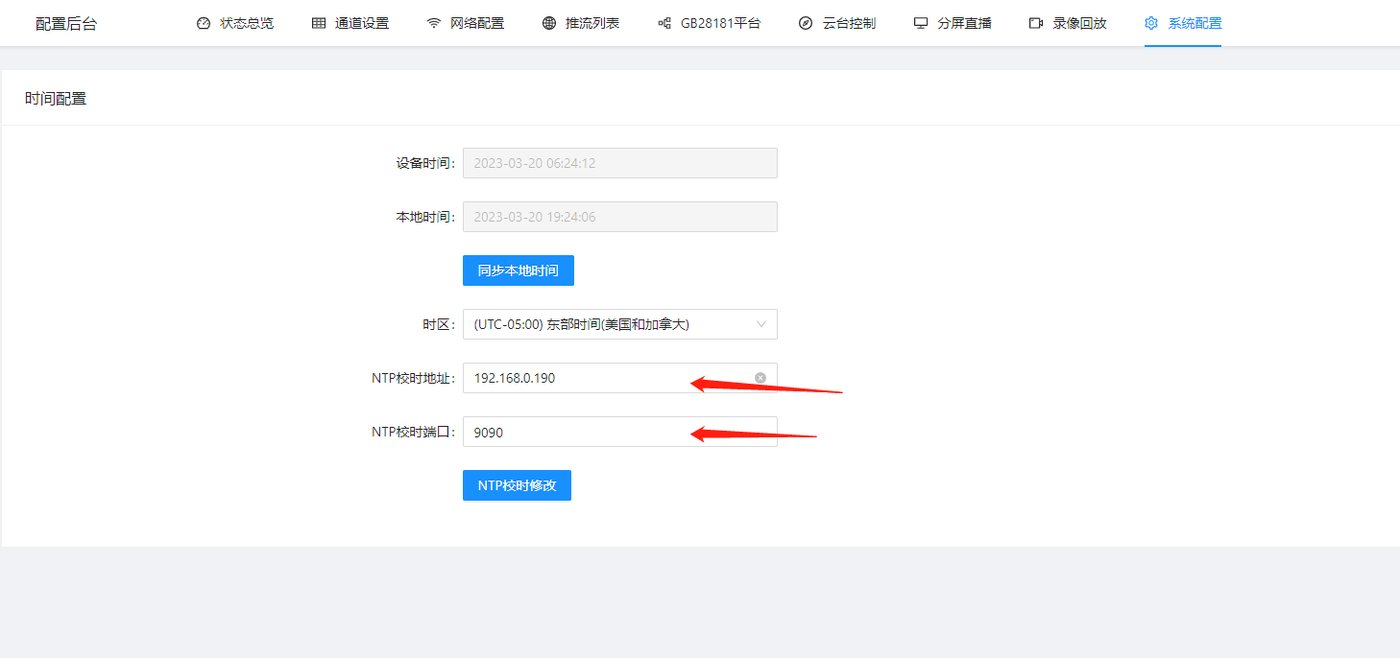
Open the device management page and select [System Configuration] ==》 [Time Configuration]
In the NTP time calibration address, fill in the IP of the computer (or server) running the above program.
In the NTP time calibration port, fill in the configured port
Click NTP time calibration to modify
Didn't find what you need?Contact us,Talk to our engineers directly.