WiFiCameraSetup Steps
Project: Device User Guide | page_id: 973
[TOC]
1. Open WeChat, search for the mini program [XSTRIVE Device Management], or scan the QR code below.

2. After opening the mini program, register a new account
3. After registration succeeds, log in
4. After entering My Streaming Devices, tap the "+" icon in the lower right corner
5. Tap Configure Camera WiFi
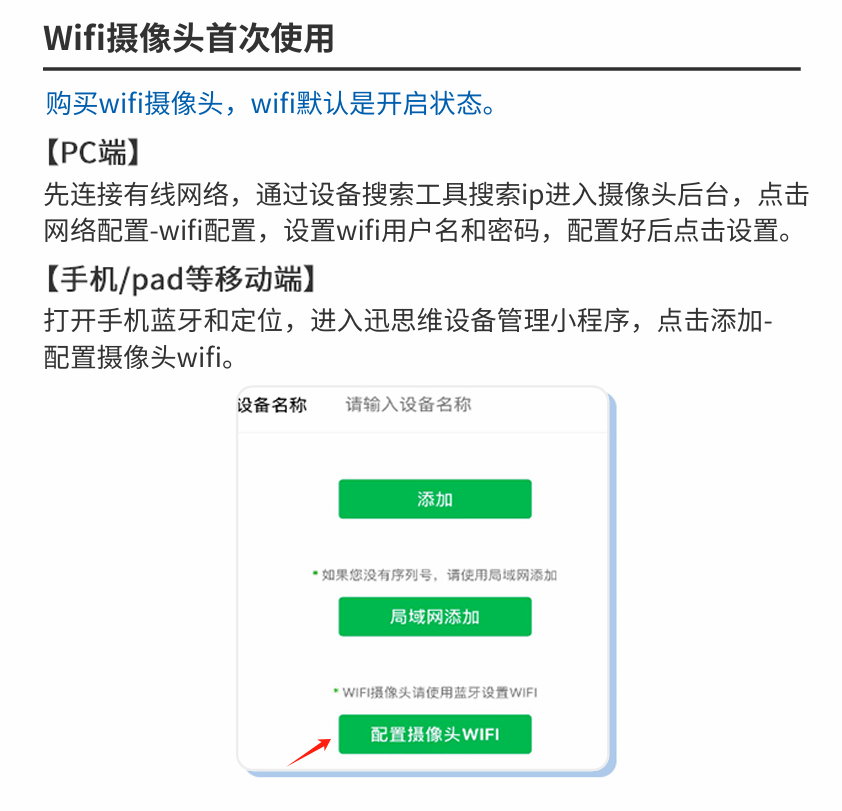
6. Bring the phone within 10 meters of the camera; once the camera is found, tap to enter
7. Enter the WiFi name and WiFi password, then tap Connect. If the WiFi has no password, you can tap Connect directly and leave the password blank.
8. Wait for the device to connect successfully.
9. After the connection succeeds, you can open the backend management page in the Chrome browser on your computer.
10. Tap Go to log in to the device and bind it to My Devices. After binding, you can view the camera image in the mini program anytime, anywhere.
11. If you want to switch the WiFi camera back to wired networking, you need to tap Switch to Wired Network in the mobile mini program.
Note:
If the connection fails, please check whether the WiFi is 2.4G WiFi. 5G WiFi is not supported for now.