Q10 Product Overview
Project: Product Specification | page_id: 1714
Q10 Remote Multi-Platform Live Streaming Device Product Introduction Card
Target audience: first introduction by sales, sending to customers via WeChat, official website display
Version: V2.0 | Updated: 2026-05-13 | Owner: Wuhan XSTRIVE Technology Co., Ltd.
Basic Product Information
| Item | Content |
|---|---|
| Product Name | Q10 Remote Multi-Platform Live Streaming Device |
| Model | XSWUVCQ10-50M1CH |
| Product Positioning | A professional-grade remote multi-platform live streaming and pushing device integrating remote streaming, multi-platform distribution and capture card functions |
| Core One-Liner | Outdoor shooting, indoor host, three streams from one device — the professional solution for remote live streaming |
| Recommended Customers | Live streaming agencies/MCN, outdoor event broadcast teams, cultural tourism scenic areas, e-commerce live streaming, cross-border live streaming teams, film and TV production companies |
| Official Website | www.xstrive.com |
| Customer Service Phone | 027-81388982 |
One-Sentence Positioning
Q10 Remote Multi-Platform Live Streaming Device — lets the host broadcast outdoor scenes while sitting indoors. It supports domestic and overseas remote collaboration, synchronous multi-platform streaming and a built-in capture card function; one device solves all problems of remote live streaming.
Three Core Use Cases
Use Case 1: 🌍 Remote Live Streaming — The Host Is Indoors, The Camera Is Outdoors
What problem it solves:
Traditional outdoor live streaming requires the host to be on site, facing problems such as bad weather, long-distance travel, jet lag fatigue and cross-border visas. Q10 physically separates the shooting device from the host — the device is placed at any outdoor location to capture the picture, while the host sits comfortably indoors to commentate and interact.
Typical applications:
- 🎬 Domestic and overseas remote collaborative live streaming (e.g. a domestic host commentating on overseas scenery/events)
- 🏔️ Extreme environment documentary live streaming (plateaus/deserts/islands/polar regions, places people cannot reach)
- 🏟️ Remote broadcast of outdoor events/activities (the photographer operates on site, the control room produces in real time)
- 🌅 24-hour slow live streaming of cultural tourism scenic areas (unattended, automatic streaming)
- 🚗 Real-time return of vehicle-mounted / drone aerial footage
Use Case 2: 📡 Synchronous Multi-Platform Live Streaming — One Capture, Distributed to All Platforms
What problem it solves:
Teams operating multiple live streaming platforms simultaneously need to push the same picture to Douyin, Bilibili, Xiaohongshu, WeChat Channels and other platforms at the same time. Traditional solutions require multiple computers or multiple OBS instances, which are costly and complex to operate.
Typical applications:
- Multi-platform synchronous live streaming of media press conferences
- Brand activity distribution across the entire network
- E-commerce live streaming spread across multiple platforms
- Course training covering multiple terminals
- Event broadcasting on multiple channels
Use Case 3: 🎥 Built-in Capture Card Function — Q10 Is Your Capture Card
What problem it solves:
Professional live streaming usually requires a capture card to feed the camera signal into a computer. Standalone capture cards are expensive (from several hundred to several thousand yuan), have poor compatibility and troublesome drivers. Q10 has a built-in capture card function; connecting it to a computer via USB makes it recognized as a camera device, with no need to buy an additional capture card.
Typical applications:
- Feeding DJI camera / action camera / DSLR footage into a computer for live streaming
- Capturing camera signals into OBS/live streaming software
- High-definition video input for video conferences
- Picture capture for online press conferences/seminars
Complete Working Topologies
Topology 1: Remote Live Streaming Mode (Network Streaming)
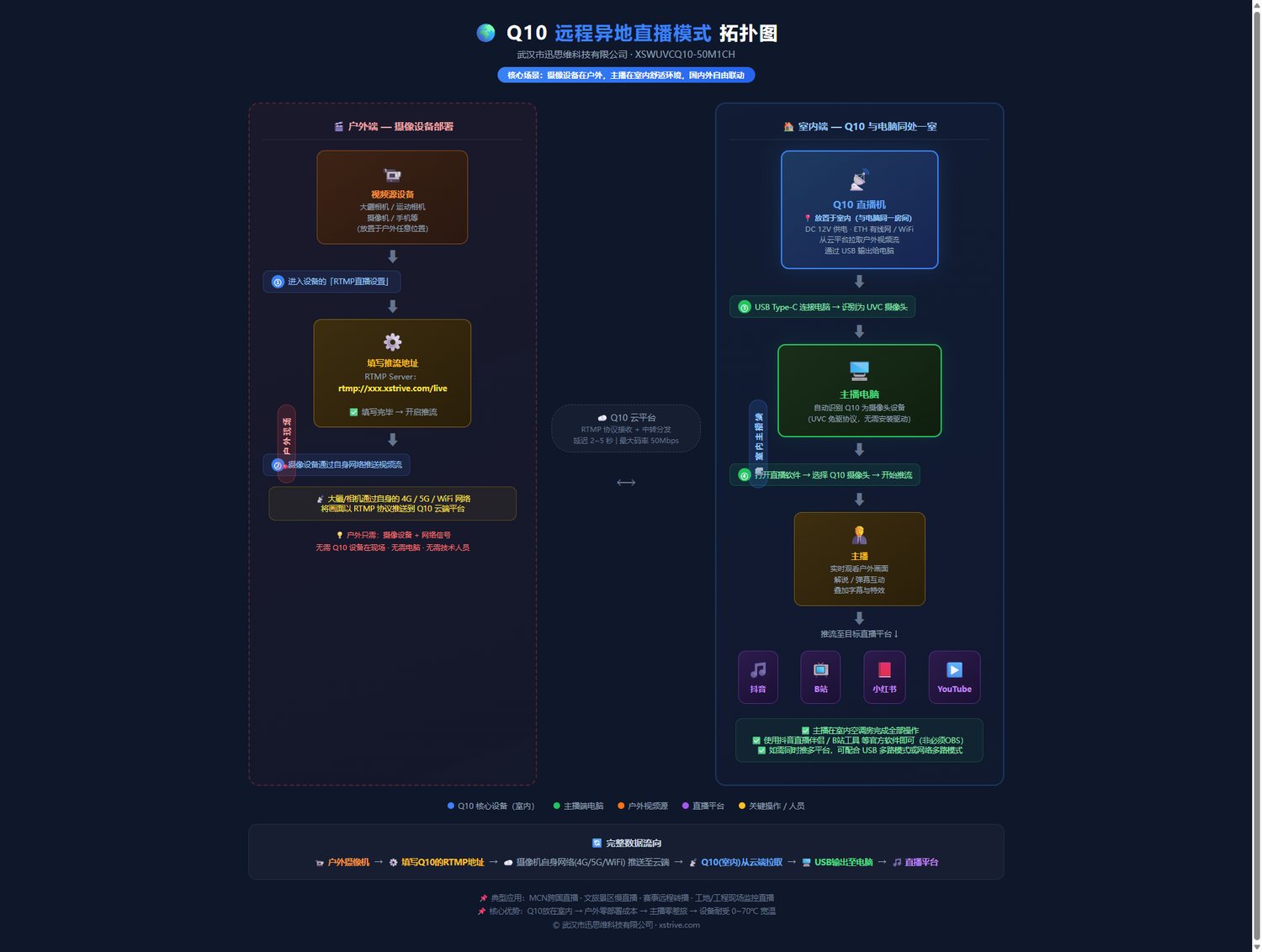
Key notes:
- For the outdoor device, simply fill in the RTMP push address provided by Q10 in the RTMP live settings of a DJI or other device
- No computer is needed at the outdoor site; the device automatically pushes the picture to the Q10 cloud
- The host pulls the picture on an indoor computer and then pushes it to the target live streaming platform
- Domestic and overseas cross-region collaboration is supported; anywhere with a network works
Topology 2: Local Multi-Platform Live Streaming Mode (USB Capture Card Mode)
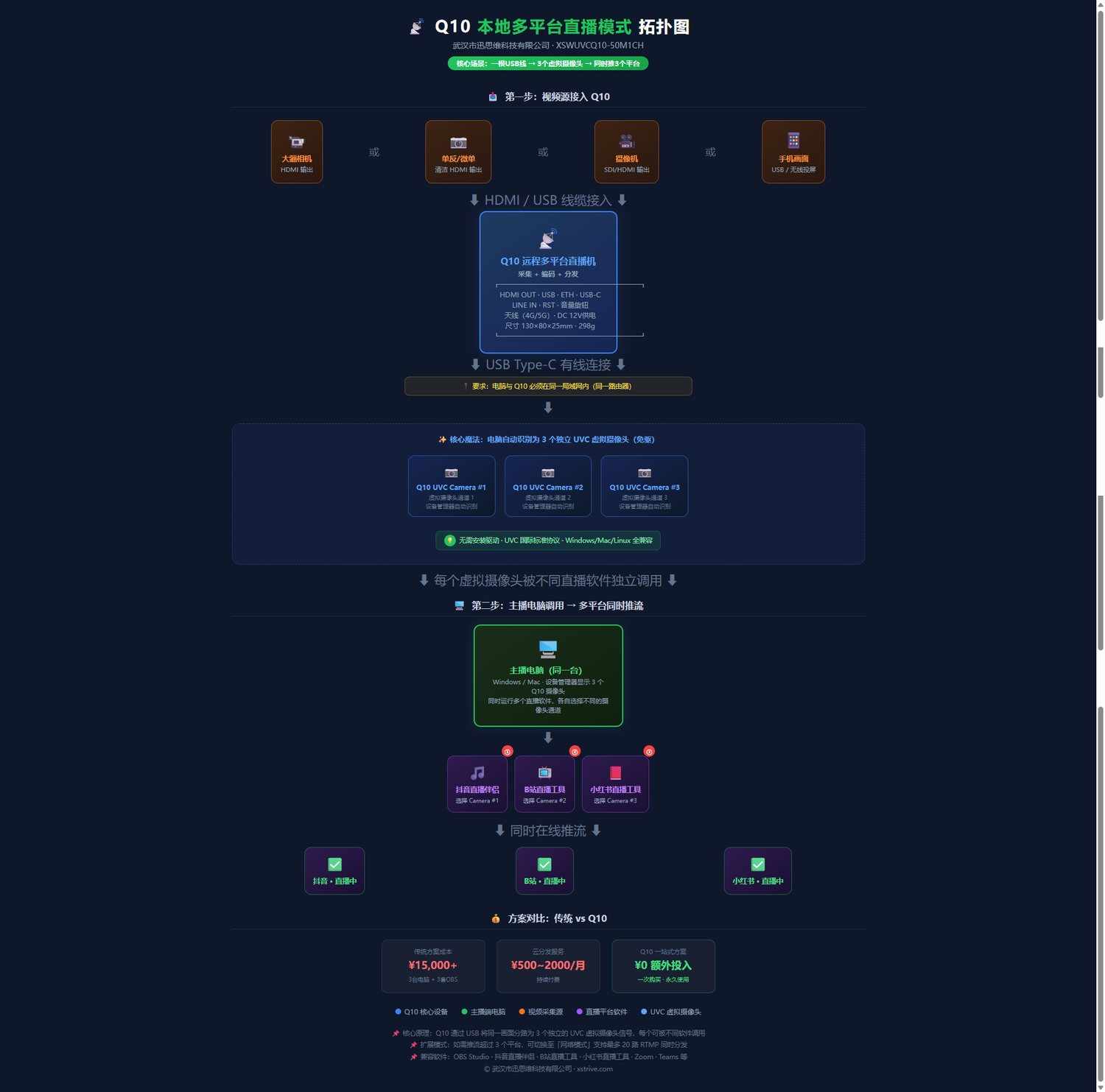
Key notes:
- Q10 is connected to the computer by wire through a USB cable
- The computer and Q10 must be on the same LAN
- The computer's Device Manager automatically recognizes 3 UVC cameras (virtual devices)
- Each virtual camera can be called by different live streaming software/platforms
- In USB mode, simultaneous streaming to 3 platforms is supported
Core Highlights
| Highlight | Description |
|---|---|
| 🌍 Remote live streaming | The device is placed outdoors and the host sits indoors, with free domestic and overseas collaboration |
| 📡 Synchronous multi-platform streaming | 3 channels in USB mode + 20 channels in network mode; one capture, distributed to all platforms |
| 🎥 Built-in capture card | No need to buy an additional capture card; it is recognized as a camera by the computer once connected via USB |
| 🔌 Plug and play | UVC standard protocol, driver-free on Windows/Mac, directly called by OBS |
| 📦 Pocket size | 130×80×25mm, only 298g, portable |
| 🛡️ Industrial-grade stability | 0~70℃ wide temperature, DC 12V power supply, 7×24h operation |
The 5 Questions Customers Ask Most Often (FAQ)
Q1: There is no computer outdoors, so how do I send the picture back?
A: No computer is needed on site. Fill in the Q10 RTMP push address in the RTMP live settings of a DJI or other camera device; the device will automatically push the picture to the Q10 platform over the network, and the host can pull it on an indoor computer.
Q2: How many platforms can one device push to at the same time?
A: There are two modes — ① USB mode (local): the computer recognizes 3 virtual cameras and can push to 3 platforms at the same time; ② Network mode (remote): up to 20 platforms at the same time.
Q3: Do I need to buy a separate capture card?
A: No. Q10 has a built-in capture card function; after connecting to the computer via USB, Device Manager automatically recognizes 3 UVC camera devices, which is equivalent to having 3 built-in capture channels that can be used directly in OBS or live streaming software.
Q4: Does it support overseas platforms, such as YouTube and TikTok?
A: Yes. Q10 pushes streams based on the standard RTMP protocol and can connect to all mainstream live streaming platforms worldwide, making it suitable for domestic and overseas cross-region collaborative live streaming.
Q5: Is installation and use complicated?
A: Very simple. USB mode only requires one cable to the computer, with automatic recognition and plug-and-play; remote mode only requires filling in the RTMP address in the camera device, with no professional technical background needed.
One-Sentence Summary
Outdoor shooting ・ Indoor host ・ Three streams from one device ・ Built-in capture card — Q10 makes remote live streaming this simple
This introduction card is compiled based on product specifications and parameters; the parameters are subject to the latest official version.