API Reference((New)Interface)
Project: Device API Documentation (New Version) | page_id: 258
Note: non-paying customers must read the documentation themselves; no technical support is provided.
Paying customers, please contact your sales manager for technical support.
This API documentation is generic. For the specific functions of a product, refer to the specific product datasheet or product page description; do not use the API documentation as a reference.
For the English version, visit: [http://endoc.xstrive.com/web/#/2/2](http://endoc.xstrive.com/web/#/2/2)
I. Signature Rules (token generation)
- The signature uses md5 encryption to generate the token parameter, which is passed for verification.
-
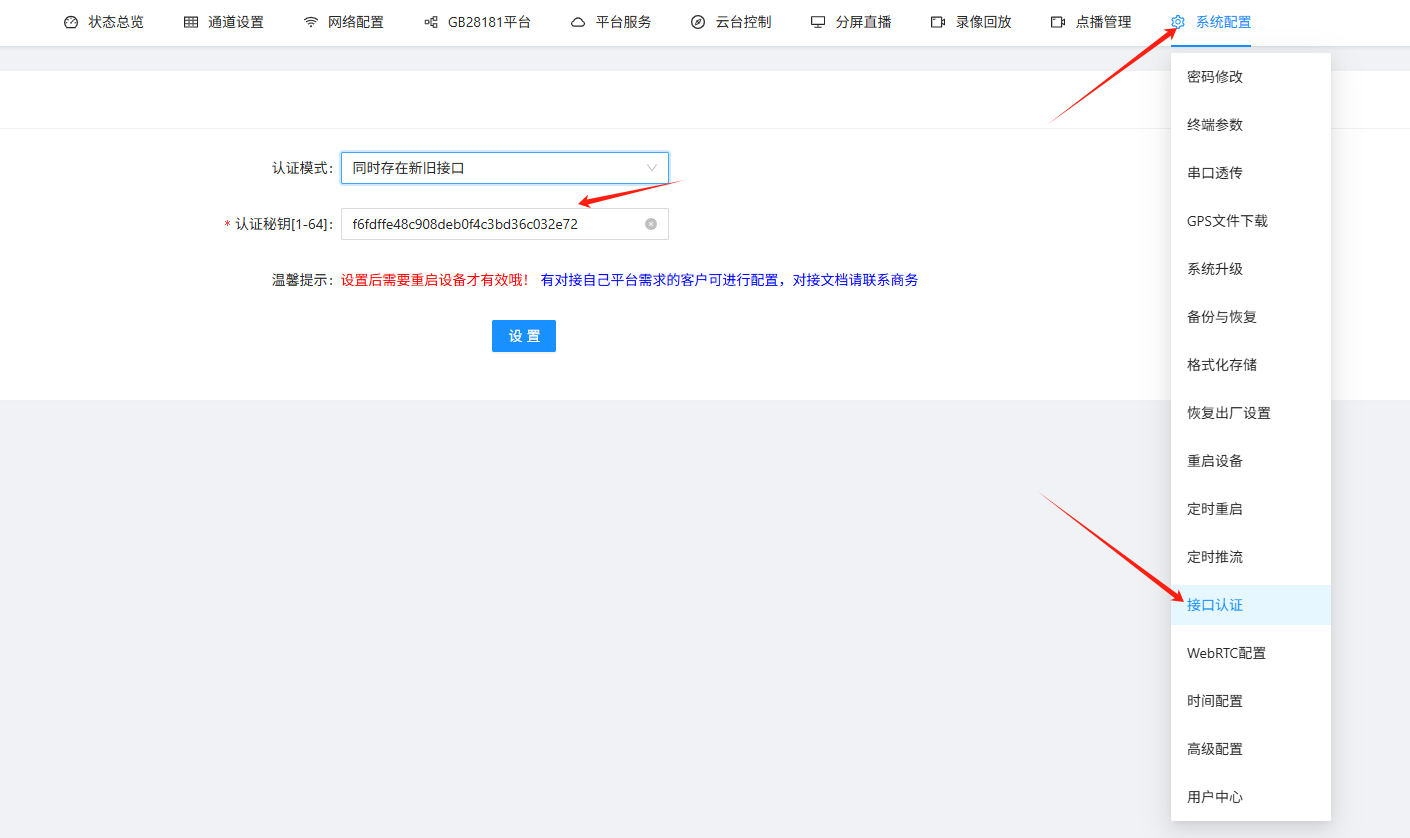
The secret key
secretdefaults to f6fdffe48c908deb0f4c3bd36c032e72-
It can be configured on the web page via 【System Configuration】==》【API Authentication】
-
It can be modified via the API /xsw/api/modUserSecret
-
-
Sort the string to be encrypted in the lexicographical order of the URL parameters and join them with &. If parameters are passed in the body, the parameters in the body are not concatenated into the string.
Parameter lexicographical sorting JS code example: keys = [key1,key2,...,secret,t]; keys = keys.sort();
For other languages, please refer to their own API documentation.
Example: refer to the sample code in Chapter 5 below
II. Fixed Parameters Carried in the Request URL
Default request content-type setting
header[‘content-type’] = application/x-www-form-urlencoded
For requests with body parameters, unless otherwise noted, the content-type is
header[“content-type”] = application/json; charset=utf-8
For cross-origin requests, set it to header[“content-type”] = text/plain; charset=utf-8
When uploading files, the content-type is
header[“content-type”] = “multipart/form-data”
| Parameter | Description | Type | Required | Additional Notes |
|---|---|---|---|---|
| token | Signature string | String | Y | |
| t | Current timestamp | Number | Y | Unit: seconds |
- Local API address
Use the search tool to find the device IP and access it by IP. For example, if the device IP is 192.168.0.15, then the API address is: http://192.168.0.15 - Remote access API address:
You need to register an account at https://platform.xstrive.com/ , or log in directly if you already have one. After logging in, bind the device to the device list by serial number, and you can then call the remote access API: https://live.xstrive.com/serialnumber/ where 【serialnumber】must be replaced with the serial number of your own device.
III. Unified Failure Response JSON Format
{
    "code": Number, // error code
    "msg": String   // error message
}
Example:
{
    "code":401, // 401 authentication failed, you need to log in again; please redirect to the login page
    "msg":"Illegal request"
}
IV. Rules for Switching from the Old API to the New API
- The new API uniformly adds the prefix /xsw
- The auth parameter is removed. For example, the auth in the URL parameters can be removed. The auth value in the body must be removed.
For example:
For the /xsw/control API: the auth in the URL parameters can be removed. - Return values are changed uniformly from strings to JSON format.
V. Reference Method for Generating the Parameter Encryption Token
import md5 from "js-md5";
const mySecret = "f6fdffe48c908deb0f4c3bd36c032e72"
export const md5Params = (params) => {
  params.t = (new Date().getTime() / 1000).toFixed(0)
  let str = "";
  let keys = Object.keys(params);
  keys.push("secret");
  keys = keys.sort(); // sort the parameter keys
  keys.forEach((key: string) => {
    if (key == "token") {
      return;
    }
    if (str != "") {
      str += "&";
    }
    if (key == "secret") {
      str += `${key}=${mySecret}`;
    } else {
      str += `${key}=${params[key]}`;
    }
  });
  params.token = md5(str);
  console.log("md5: ", str, params.token)
  return params;
};

// Usage example: get the recording list
export const GetRecordList = () => {
  const args = {
    beginTime: 1673193600000,
    endTime: 1673279999999,
    channel: 0,
  }
  const newArgs = md5Params(args)
  // String concatenated before md5 (all parameters except token)
  // beginTime=1673193600000&channel=0&endTime=1673279999999&secret=f6fdffe48c908deb0f4c3bd36c032e72&t=1673255651
  // Generated token: 80c192912ea8c97523876b47cf2658a1
  const reqUrl = `http://192.168.0.15/xsw/api/record/list?beginTime=${newArgs.beginTime}&endTime=${newArgs.endTime}&channel=${newArgs.channel}&t=${newArgs.t}&token=${newArgs.token}`
  console.log("reqUrl", reqUrl)
  // Final reqUrl: http://192.168.0.15/xsw/api/record/list?beginTime=1673193600000&endTime=1673279999999&channel=0&t=1673255651&token=80c192912ea8c97523876b47cf2658a1
}
Where
mySecret is replaced with your secret key
md5 third-party library: js-md5
Token Generation Test Tool
Click to download apitool.zip