Home / Docs Center / Device API Reference / Face RecognitionRecording Query
Face RecognitionRecording Query
Project: Device Interface Document (New Version) | page_id: 1132
[TOC]
Brief Description
- Face recognition recording query; the image format must be 640*480 jpg
Request URL
/xsw/api/record/faceRecord
Request Method
- POST
- header[“content-type”] = “multipart/form-data”
URL Parameters
| Parameter Name | Required | Type | Description |
|---|---|---|---|
| date | Yes | string | Query date, example: 20250427 |
| channel | No | int | Recording channel, default channel 0 |
| fragment | No | int | Query segment interval, in minutes, default 1440 minutes i.e. 24 hours |
| frame | No | int | Reserved playback time before and after, in minutes, default 15 minutes |
Body Parameters
| Parameter Name | Required | Type | Description |
|---|---|---|---|
| filename | Yes | File | Face image, must be 640*480 jpg |
Request Example
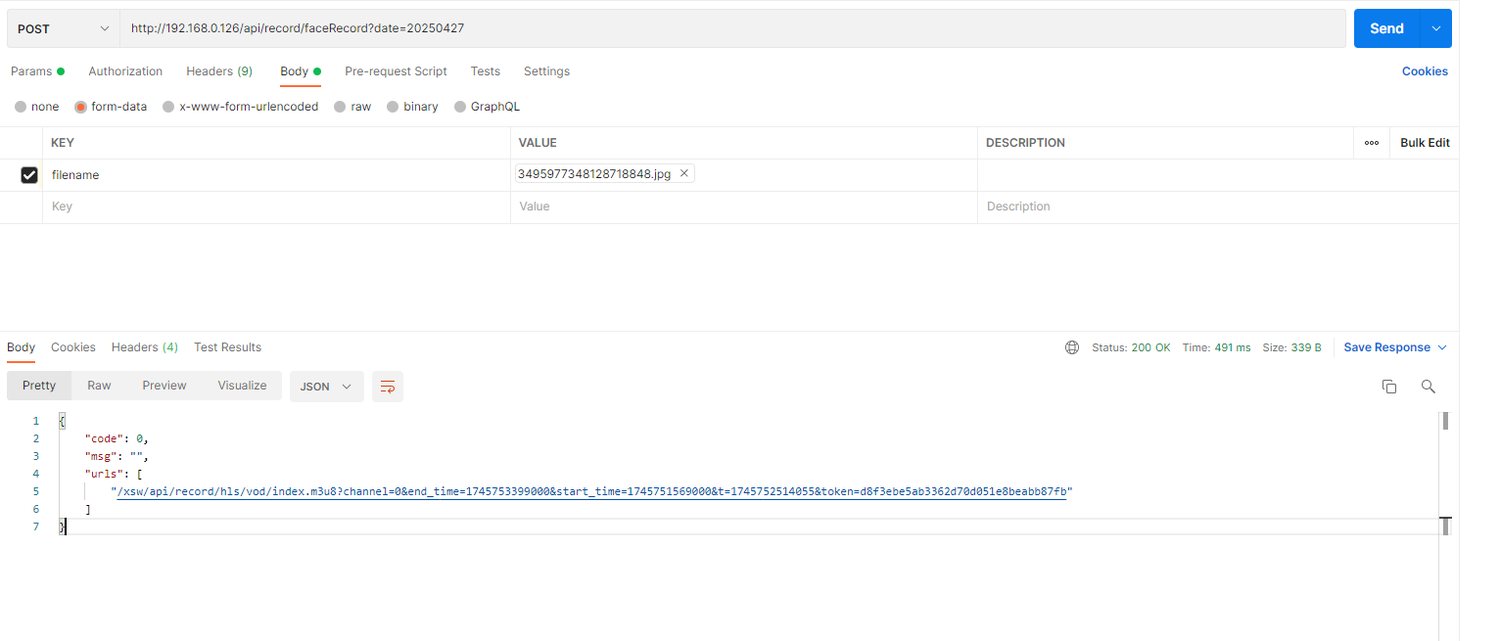
Return Example
  {
    "code": 0,
    "msg": "",
    "durs": [{"bt": 123, "et": 456}, {"bt": 789, "et": 999}]
  }
Return Parameter Description
| Parameter Name | Type | Description |
|---|---|---|
| code | int | Status code, 0 means a record was recognized, 20001 means not recognized, others mean operation failure |
| msg | string | Status message |
| score | int | Similarity 0-100 |
| durs | Array | List of recording start and end times |
Notes
-
The returned durs requires you to query the cloud recording list yourself and filter the file list for playback
-
Error code 20001 means no record was recognized
Didn't find what you need?Contact us,Talk to our engineers directly.