Home / Docs Center / Device API Reference / InterfaceExample Test Tool
InterfaceExample Test Tool
Project: Device Interface Document (New Version) | page_id: 1349
Recording List Query Example
import md5 from "js-md5";
const mySecret = "f6fdffe48c908deb0f4c3bd36c032e72"
export const md5Params = (params) => {
  params.t = (new Date().getTime() / 1000).toFixed(0)
  let str = "";
  let keys = Object.keys(params);
  keys.push("secret");
  keys = keys.sort(); // Sort the parameter keys
  keys.forEach((key: string) => {
    if (key == "token") {
      return;
    }
    if (str != "") {
      str += "&";
    }
    if (key == "secret") {
      str += `${key}=${mySecret}`;
    } else {
      str += `${key}=${params[key]}`;
    }
  });
  params.token = md5(str);
  console.log("md5: ", str, params.token)
  return params;
};

// Usage example: get the recording list
export const GetRecordList = () => {
  const args = {
    beginTime: 1753153239709,
    endTime: 1753199999999,
    channel: 0,
  }
  const newArgs = md5Params(args)
  // The string to be concatenated before md5 (all parameters except token)
  // beginTime=1753153239709&channel=0&endTime=1753199999999&secret=f6fdffe48c908deb0f4c3bd36c032e72&t=1753154927
  // Generated token: f0f41495e514d0ed1fb51e160cc22542
  const reqUrl = `http://192.168.0.143/xsw/api/record/list?beginTime=${newArgs.beginTime}&endTime=${newArgs.endTime}&channel=${newArgs.channel}&t=${newArgs.t}&token=${newArgs.token}`
  console.log("reqUrl", reqUrl)
  // Final reqUrl:
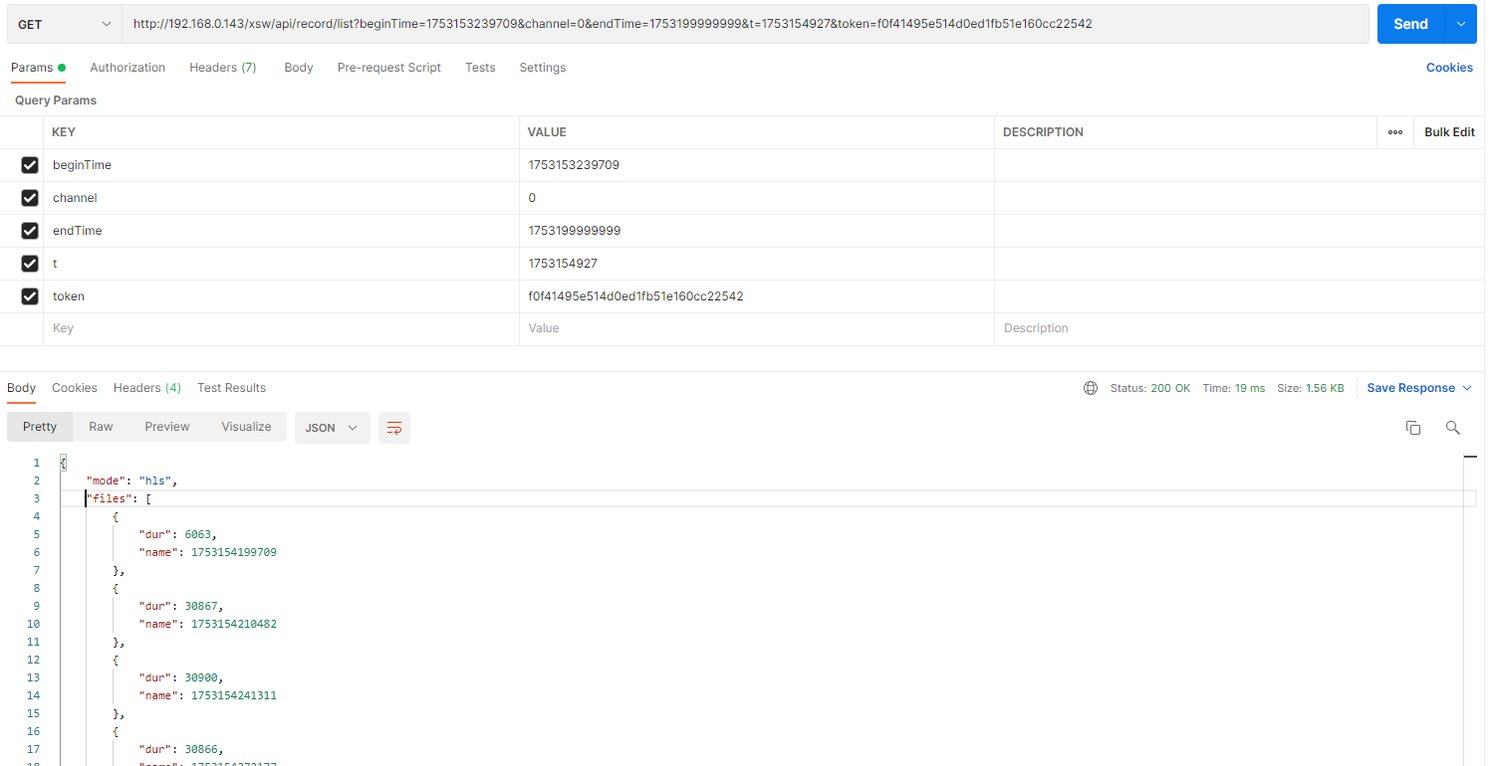
  // http://192.168.0.143/xsw/api/record/list?beginTime=1753153239709&channel=0&endTime=1753199999999&t=1753154927&token=f0f41495e514d0ed1fb51e160cc22542
}
Among them
Replace mySecret with your secret key
md5 third-party library: js-md5
Postman Example
Token Generation Test Tool
Click to download apitool.zip
Didn't find what you need?Contact us,Talk to our engineers directly.