Test ServiceSoftware
Project: Device Interface Document (New Version) | page_id: 1135
Download
Supports running in Windows and Linux environments
For the production environment it is recommended to use the Linux version, with the system using ubuntu
Running Instructions
On Windows, run it by double-clicking uploadserver-win.exe
On Linux, run it by executing ./uploadserver-linux on the command line
Default port: 10082
Default file storage path: the media folder in the current directory
Example of running with a specified port and path:
./uploadserver-win.exe -p 10091 -d 30
./uploadserver-linux -p 10091 -r /res -d 7
-p 10091 uses port 10091
-r /res stores file information in the /res directory
-d 7 stores for 7 days
Usage Instructions
Upload Address Example
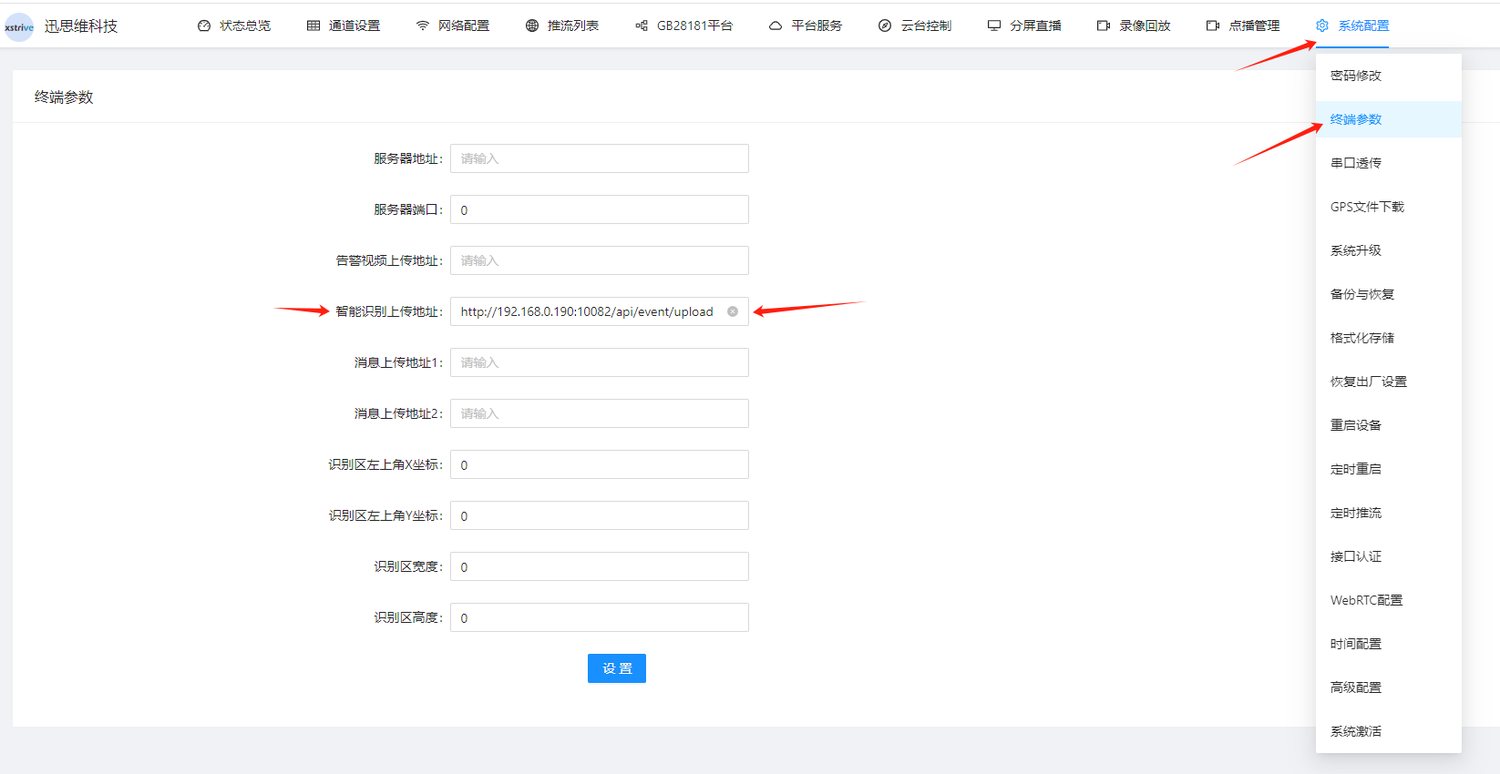
http://192.168.0.190:10082/api/event/upload
Example of Adding Custom Parameters
http://192.168.0.190:10082/api/event/upload?userValue1=abc
Configuration Page Example for Camera Streamers