Home / Docs Center / Board Shipping Resources / 3516ev200Development Board
3516ev200Development Board
Project: Development Board Shipping Materials | page_id: 1188
3516EV200 Board Environment Setup and Operation Guide
1. Flashing uboot, kernel and file system:
Choose any Hitool version (as long as it supports 3516EV200), for example the Hi3516EV200 development package:

Usually it is in the /software/pc/HiTool directory
1. Step 1: Select the chip
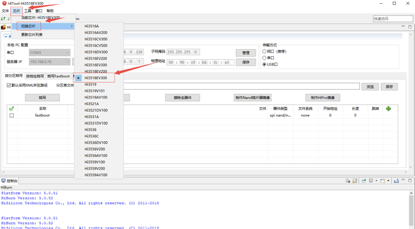
2. Step 2, click the burn button as prompted below:
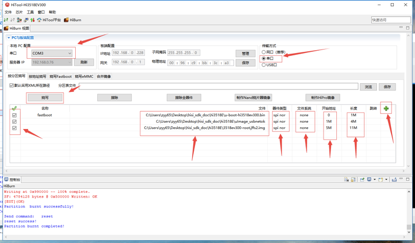
Select the correct serial port number, select serial port as the transmission method, burn by partition, and use the add pattern button to add the kernel and file system options. Select spi_nor for all device types, do not select the file system (set it directly to none), set the uboot address from 0 to 1M, the kernel address from 1M to 4M, and the file system from 5M to 11M. Click burn, then power the board on again. The burning process may take 6 to 7 minutes.
Note: select the uboot that comes with the HiSilicon SDK for uboot, select uImage_usbnetok for the kernel, and select 3518ev300-root.jffs2.img for the file system
Step 3: Set the uboot parameters
After burning, power the board on again:
Enter the uboot interface and set the uboot parameters:
setenv bootargs 'mem=32M console=ttyAMA0,115200 root=/dev/mtdblock2 rootfstype=jffs2 rw init=/linuxrc mtdparts=hi_sfc:1M(boot),4M(kernel),11M(rootfs)'
setenv bootcmd 'sf probe 0;sf read 0x42000000 0x100000 0x400000;bootm 0x42000000'
sa
Execute the above commands in sequence, then enter sa to save.
Run the HiSilicon venc sample
1) Enter the /usr/ext/ko/ directory:
cd /usr/ext/ko
2) Execute the following command to load the driver:
./load3518ev300 -a -sensor0 imx327 -osmem 32M -offline
3) Mount with the virtual machine:
ifconfig eth0 up;
ifconfig eth0 192.168.0.225;
mount -o nolock 192.168.0.92:/home/xstrive/hisi/   /mnt/
cd /mnt/Hi3516EV200_SDK_V1.0.1.0/mpp/sample/venc/
4) Execute the program:
./sample_venc 0
5) Then select 0 and C in sequence
Then it starts recording the camera video.
Material Download Links
3516ev200 development materials
Link:https://pan.baidu.com/s/1ZGC0wZcgx7dwbFdyuKK_tw Password:qyij
3516ev200 sdk
Link: https://pan.baidu.com/s/1PF7_E140gCtrBqQL6Kp7Ig Password: ogc3
Virtual machine download
Link:https://pan.baidu.com/s/107nbfIdcIj-vFoSu4f_mwQ Password:6b0e
liteos sdk:
Link:https://pan.baidu.com/s/1o0ZeqStQbRJDA_SdkWdi8A
Extraction code:h52q
Didn't find what you need?Contact us,Talk to our engineers directly.