Home / Docs Center / Product Datasheets / 100-Channel 1000-Concurrent Streaming Server
100-Channel 1000-Concurrent Streaming Server
Project: Product Datasheet | page_id: 403
| 100-Channel 1000-Concurrent Streaming Server | |
|---|---|
| Model | XSWTVS-1000M100CH/F |
| Network Device Discovery | ONVIF |
| Network Video Input Protocol | HTTP/RTSP/RTMP/RTP/UDP-TS/GB28181/WEBRTC |
| Network Video Output Protocol | HTTP-FLV/RTSP/RTMP/RTMPS/UDP-TS/HLS/WS-FLV/WS-RAW/ONVIF/GB28181/WEBRTC |
| Input Video Encoding Format | H.264/H.265 |
| Input Audio Encoding Format | AAC/G.711/MP3/AC3 |
| Output Video Encoding Format | H.264/H.265/AVS/AVS+ |
| Output Audio Encoding Format | AAC |
| Max Network Video Channels | 100 |
| Max Concurrent Viewers | 1000 |
| Video Transcoding Capability | Max 16 channels of 1080p |
| Number of Ethernet Ports | 2 |
| Max Total Bitrate | 1000Mbit (the actual value varies by protocol and encoding format) |
| Recording/VOD | Built-in 7GB storage, supports 1 external hard disk of up to 16T, self-installation not supported |
| Remote Upgrade | Supported |
| Remote Management | Supports remote modification of device parameters and remote playback of device recordings |
| Operating Language | Chinese, English |
| Power Supply | AC 100-240V |
| Operating Temperature | 0~70℃ |
| Dimensions | 440X216X45mm(1U rack-mount chassis) |
| Weight | 1918g |
Product Images
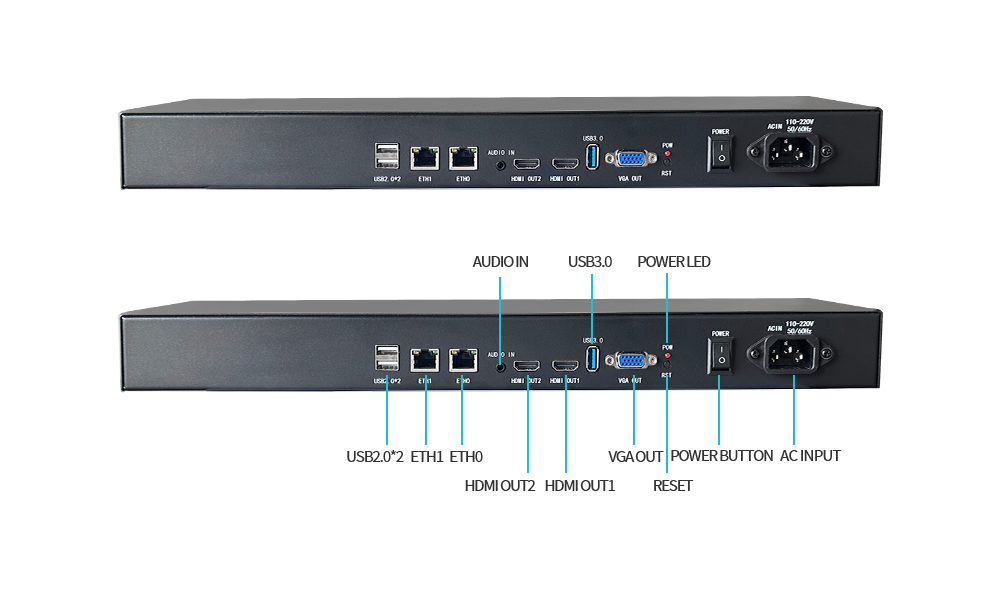
Product Manual Link (Chinese Version)
In-site Docs Center
Streaming Server FAQ and Troubleshooting
In-site Docs Center
Device FAQ
| Question | Answer |
|---|---|
| 1、Are there any subsequent software usage fees? | No |
| 2、What cameras are supported? | All IP cameras |
| 3、Is external network viewing done through a browser? | Yes, both browsers and mini programs work |
| 4、The video source is HDMI and every classroom's network TV needs to see the video. How should it be deployed? | On the TV side, a smart TV can directly access the web page for playback. Use an HDMI encoder + streaming server |
| 5、There is no shutdown menu in the device. How do I shut it down? | There is a hardware switch |
| 6、How can I send a link to others on the external network so they can play it directly? | Copy the address in the streaming management page and send it out |
| 7、Which ports does this device map, TCP or UDP? | TCP. HTTP is 80 and RTMP is 1935 |
| 8、Can the streaming platform be deployed privately? | Yes, private deployment is available for a fee |
| 9、Can the video output be in MPEG2 format? | No, only h.265 and h.264 |
| 10、For live streaming, is any other equipment needed besides the camera? Does the camera also need an encoder? | A camera plus a streaming server is enough. It depends on whether it is an IP camera or an HDMI camera; an HDMI camera requires an HDMI encoder |
| 11、If a 10M bitrate video is pushed to the streaming server via RTSP and then pushed to the terminal via RTSP, will the video be compressed? | No, it will not be compressed. The original 10m bitrate stays 10m |
| 12、How can I display it on my own cloud software? | The device generates a playback address, which can be called in the cloud software |
| 13、Is permission assignment supported? For example, can a specified person only view certain specified camera feeds? | Permission assignment is supported. Sub-account access permissions can be set in the backend |
| 14、Can I log in to the server system through SSH? | Yes, but you need to contact us to change the password separately. Note that once the password is opened, the warranty is immediately voided, so please consider carefully |
| 15、How is the number of viewers determined? | If relayed through the cloud platform, the number of viewers is unlimited and billing is by traffic at 0.4 CNY/GB. With a public IP and local port mapping, there is a limit. Different devices have different performance, so it depends on the specific video bitrate and number of viewers |
Didn't find what you need?Contact us,Talk to our engineers directly.