Home / Docs Center / Dev Boards & Modules / SV830CFace Recognition Terminal
SV830CFace Recognition Terminal
Project: Board Introduction | page_id: 1229
Product Specifications
| Module | Specification | Description |
|---|---|---|
| Power Supply | 12V | |
| SPI NAND FLASH | 64M | |
| Hard Disk | 512M DDR2 | |
| Chip Type | Intellifusion SV830C | |
| Dual Camera | One RGB + one NIR | Dual sensor, HD high-sensitivity face sampling and recognition |
| LED White Light | 4 | Front high-brightness white light, supports adaptive turn-on |
| LED Infrared Light | 2-4 | Front infrared light, supports adaptive turn-on |
| LCD Screen | 4.3-inch NV3047D color screen | Supports text and image settings |
| Backlight | 1 | Adaptive mode, brightness level 0-8, 0 means screen off |
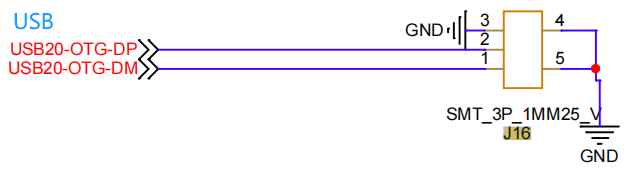
| USB OTG | 1 | Firmware burning USB port |
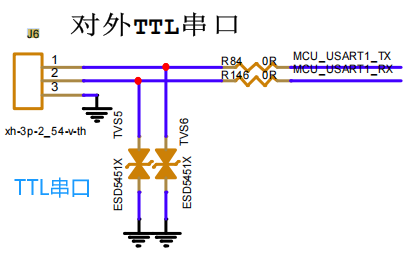
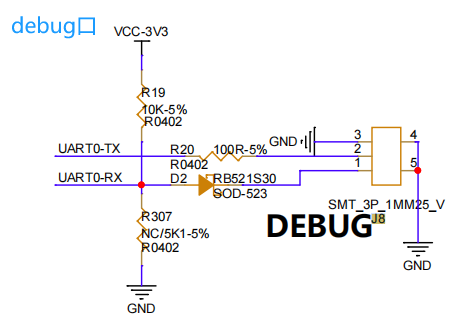
| UART | 2-4 | Serial port |
| Ethernet Port | 1 | Supports Ethernet OTA firmware upgrade |
| CARD | / | Can support the card swiping function |
| WIFI | / | Can support the WiFi function |
| AUDIO | / | Can support audio playback |
I. Product Physical Images
Overall Product Size: 135*135mm
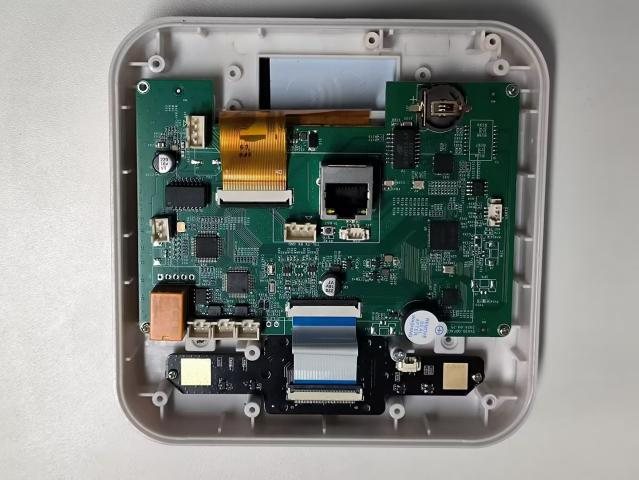
Face Recognition Device Circuit Board (Not Connected)
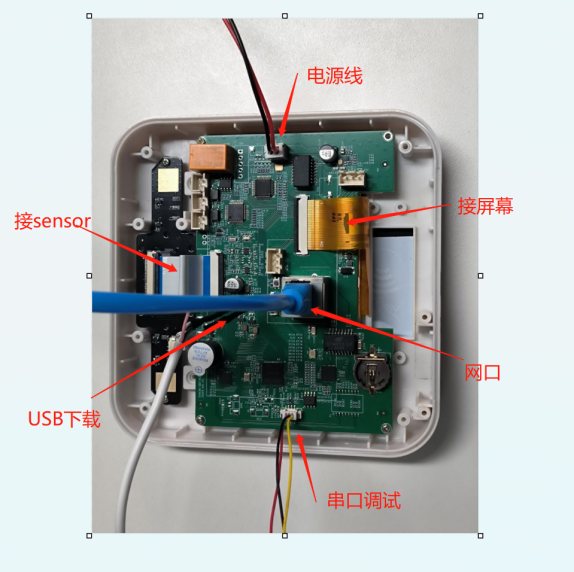
Face Recognition Device Circuit Board (Connected)
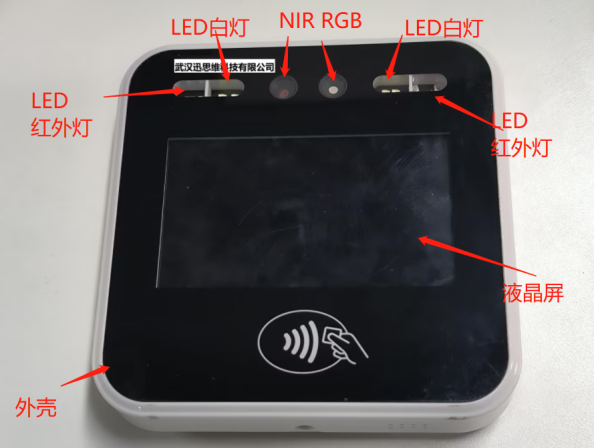
Face Recognition Device Appearance (Powered Off)
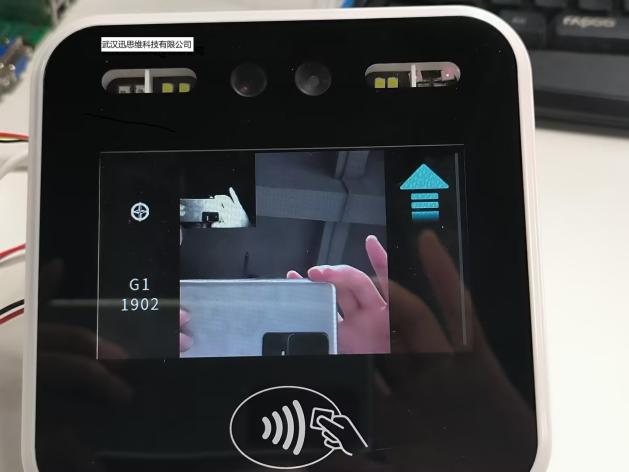
Face Recognition Device Appearance (Powered On, No Face Recognition)
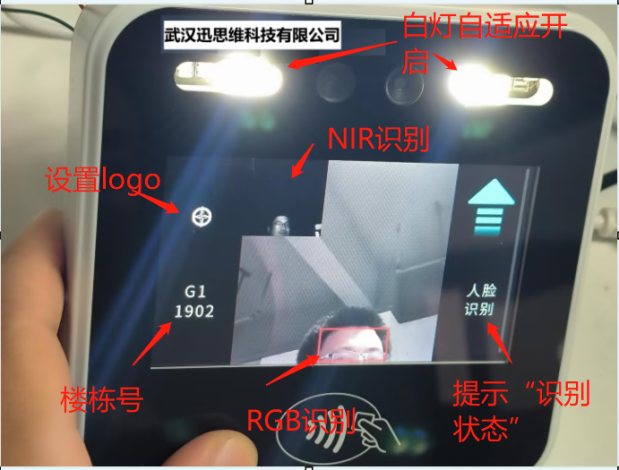
Face Recognition Effect Diagram
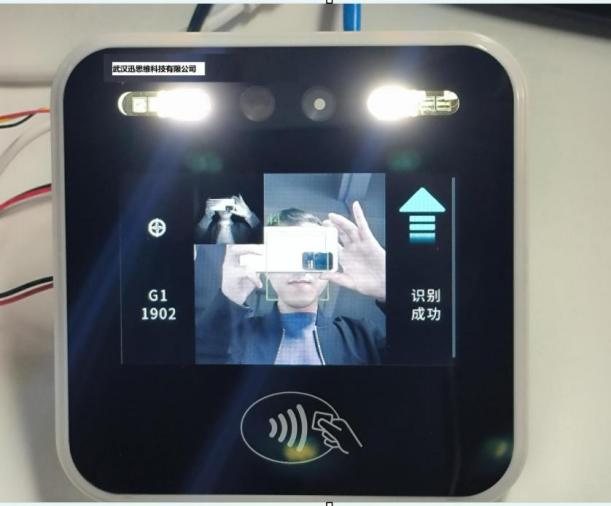
Successful Face Recognition Effect Diagram
II. Chip Specifications
| CPU: single-core Arm Cortex-A7 CPU and RISC-V CPU |
|---|
| NPU: self-developed 0.5 TOPS neural network processing unit |
| Memory: built-in 512Mb DDR2 memory |
| Video Codec: supports H.264 2K@30fps video encoding |
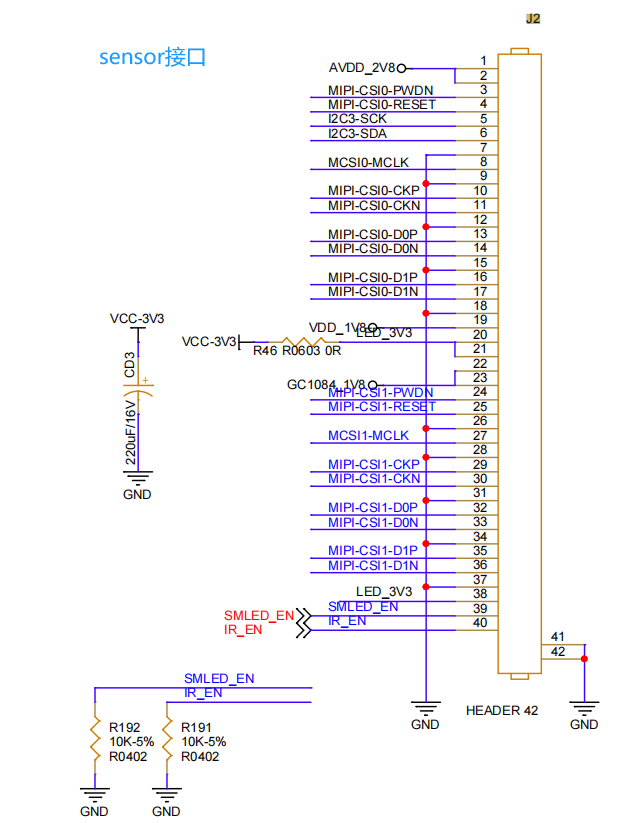
| Camera: supports DVP and MIPI-CSI2 dual-channel video input |
| ISP: supports 4MP@30fps or 5MP@30fps, with D-WDR and 3DNR functions |
| Display: supports Serial RGB/MCU/BT.656/SPI/MIPI DSI display interfaces |
| Package: QFN88 package, with a size of 9mm x 9mm |
In addition, SV830C also supports a variety of external interfaces, such as MIPI-CSI2, I2C and SPI, providing customers with rich expansion and connection options. This chip is designed for low-power applications and supports fast boot and image output. It is suitable for AI-IPC, smart doorbell peephole viewers, smart door locks, dash cameras and other smart terminal devices.
The Intellifusion SV830C efficiently supports intelligent algorithms such as human shape detection, face detection/recognition, vehicle detection, cry/abnormal sound detection and ADAS, giving it broad application prospects in the field of smart security. Moreover, its powerful performance and flexible interface options also make it an ideal choice for customized solutions.
III. Interface Circuit Diagrams
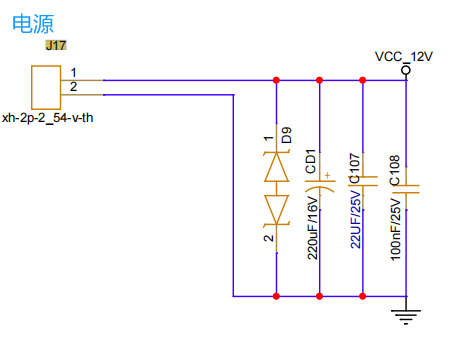
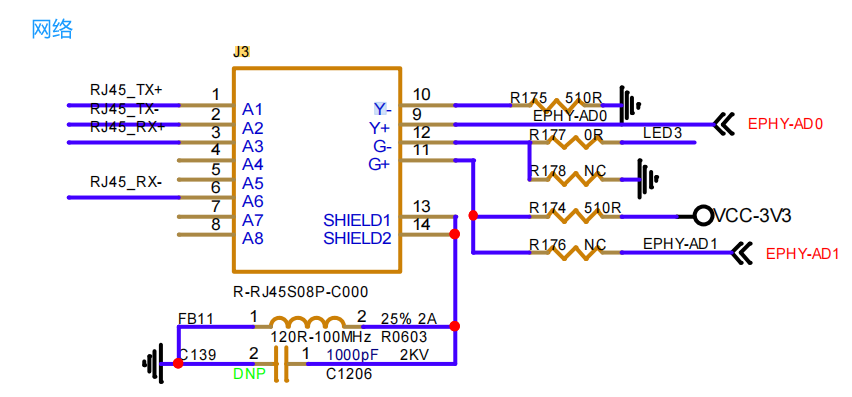
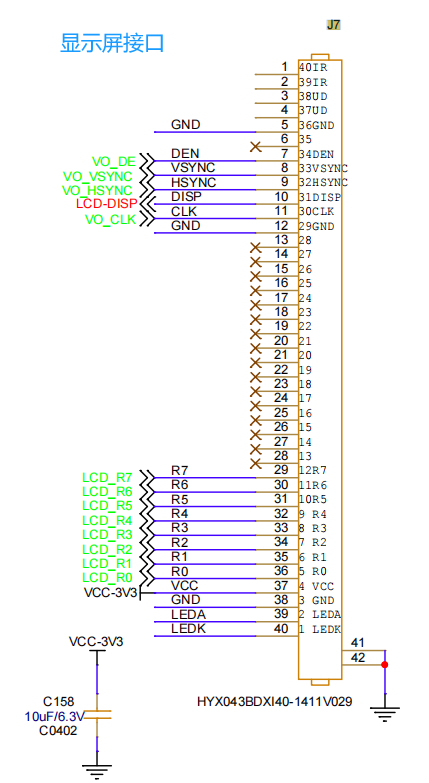
IV. Product Overview
This high-end face recognition device integrates advanced biometric technology and intelligent algorithms, and is designed to improve the efficiency of security monitoring and management. Through high-precision screen display, dual camera configuration and high-brightness LED indicators, it implements diversified functions such as face liveness detection and face registration and recognition, and is widely used in access control systems, attendance management and security monitoring.
V. Introduction to the Main Product Functions
1. HD LCD screen: equipped with a high-resolution color LED screen for face recognition, status prompts and identity verification result feedback. The screen supports Chinese and English language interfaces, which can be switched freely as needed, ensuring the clarity of information display and the friendliness of user interaction.
2. Dual camera system: adopts a high-performance dual camera design. The main camera is responsible for capturing HD face images, while the auxiliary camera is used for depth information perception, effectively enhancing the accuracy and speed of face recognition. The two cameras work together to achieve accurate recognition even in complex lighting environments.
3. LED fill light: the front of the device is equipped with high-brightness LED indicators, which can be turned on adaptively to provide fill light for face recognition.
4. Liveness detection technology: integrates advanced face liveness detection technology, which can effectively distinguish real faces from photos, videos and other forgery means, prevent fraud, and ensure the authenticity and security of identity recognition.
5. Efficient face registration and recognition: supports fast face registration; users can complete information entry in just a few simple steps. The recognition speed is fast and the response time is short, greatly improving passage efficiency and user experience.
6. Ethernet OTA remote upgrade: supports http, ftp and other remote upgrades, making it easy to connect to existing management systems and efficiently manage devices in batches.
VI. Operation Guide
(1) Install and deploy the device where access control, attendance or monitoring is required.
(2) Collect the face image information of the relevant personnel as required. ID photos are best; avoid full-body or half-body photos.
(3) For face photo registration, you can register in batches through an Excel sheet, or register a single face through the MCU.
(4) After the registration is completed, the device enables the liveness detection function.
(5) When the relevant personnel pass through the face recognition device, they need to perform face recognition. Those who pass the recognition can pass the access control or clock in for attendance successfully. Personnel whose faces are not registered or whose photos do not meet the requirements will fail the recognition and need to contact the administrator for manual processing.
VII. Supports Management Platform Access (Taking MCU Serial Port Communication as an Example)

(1) The MCU can register face photos, supporting jpg and png formats.
(2) The MCU can delete face registration information.
(3) The MCU can query face registration results.
(4) The MCU can set and obtain the liveness detection threshold.
(5) The MCU can set IP, DNS and other network parameters.
(6) The MCU can configure the network upgrade package address to perform an OTA upgrade.
(7) The MCU can query the version number.
(8) The MCU can set the community name, department name, room number, building number, etc. of the device.
(9) More functions can be implemented according to user needs.
VIII. Maintenance and Care
(1) Clean the camera and screen regularly to prevent dust and dirt from affecting the recognition effect.
(2) Pay attention to waterproof and moisture-proof measures, avoid exposing the device to extreme weather conditions, and maintain a suitable operating temperature and humidity.
(3) If a fault occurs, please contact customer service or the administrator for technical support.
Didn't find what you need?Contact us,Talk to our engineers directly.