4G-CAT1Module
Project: Board Introduction | page_id: 1228
CAT1 Module Introduction
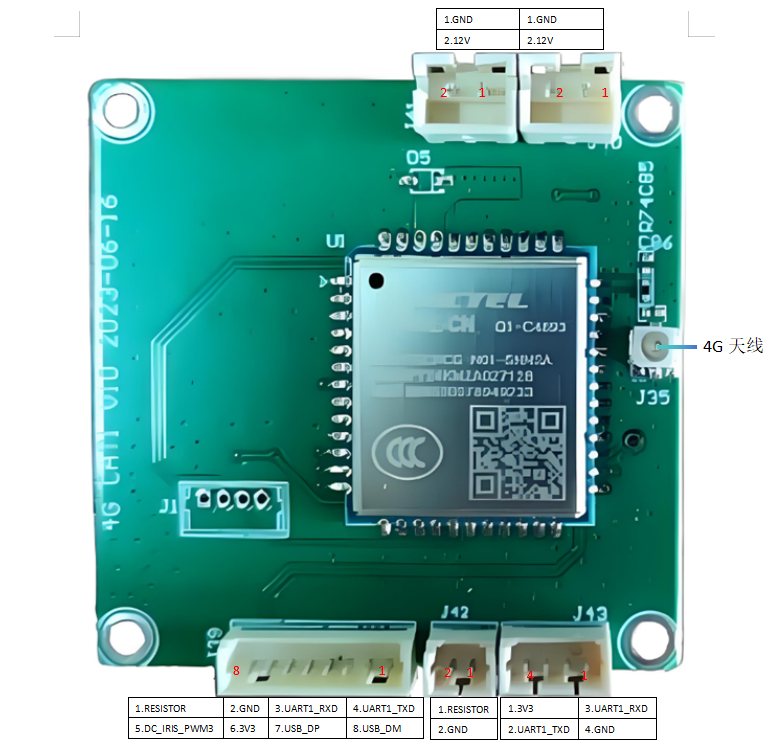
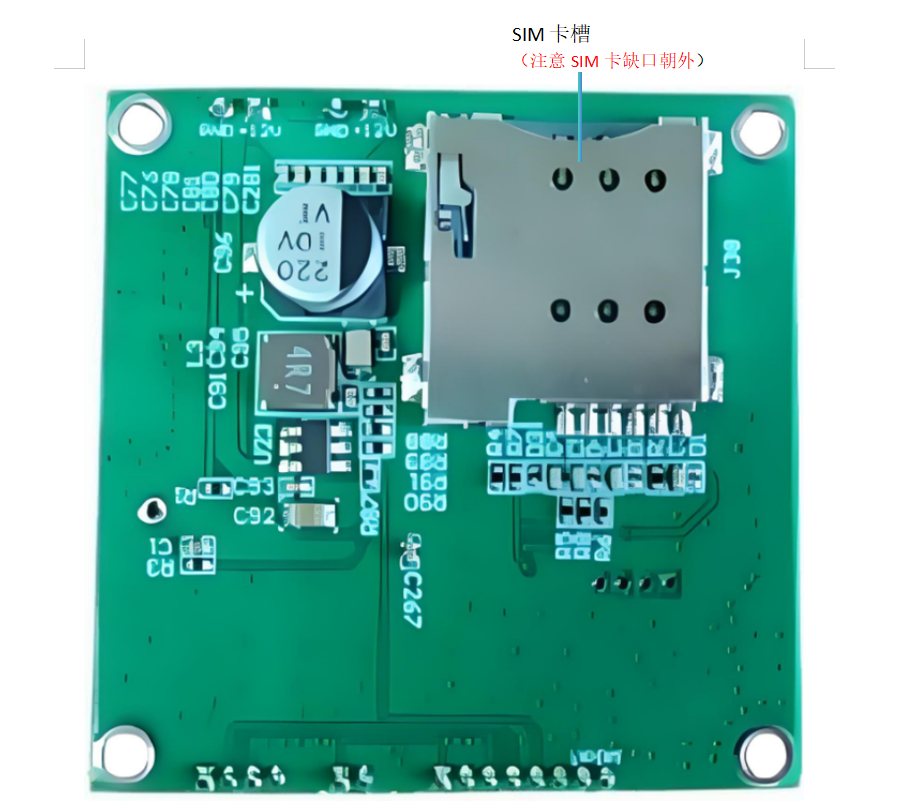
1. Introduction
This document applies only to the EC801E-CN industrial-grade module.
This document introduces the features of the EC801E-CN module and the hardware and air interfaces for connecting it to your application. It also provides the module's hardware interface features, RF features, electrical features, mechanical specifications and other related information, so that you can quickly understand this module.
2. Product Overview
The module is a surface-mount module with a compact package.
| Frequency Bands and Functions EC801E-CN |
|---|
| LTE-FDD B1/B3/B5/B8 |
| LTE-TDD B34/B38/B39/B40/B41 |
| Wi-Fi Scan (optional) 802.11b/g/n with 2.4G DSSS beacon |
LTE-TDD B41 only supports 140 MHz bandwidth (2535~2675 MHz). The Wi-Fi Scan of the module shares the antenna interface with the main antenna; the two functions cannot be used at the same time and can only be time-division multiplexed. Wi-Fi Scan only supports receiving, not sending.
3. Key Features
| Power Supply Voltage ⚫ Power supply voltage range: 3.3~4.3 V |
|---|
| ⚫ Typical power supply voltage: 3.8 V |
| Short Message (SMS)* |
| ⚫ Text and PDU mode |
| ⚫ Point-to-point short message sending and receiving |
| ⚫ Short message cell broadcast |
| ⚫ Short message storage: stored in the module by default |
| USB Interface |
| ⚫ Compliant with the USB 2.0 specification (slave mode only) |
| ⚫ Data transfer rate: up to 480 Mbps |
| ⚫ Used for AT command communication, data transmission, software debugging, firmware upgrade and log output |
| ⚫ USB-to-serial driver: supports USB drivers under Windows 8.1/10/11, Linux 2.6~6.7, Android 4.x~13.x |
| and other operating systems |
| USB_BOOT Interface Supports 1 forced download interface |
| USIM Interface |
| ⚫ Supports dual SIM single standby |
| ⚫ The USIM1 interface supports 1.8 V and 3.0 V USIM cards, while the USIM2 interface only supports 1.8 V USIM cards |
| ⚫ If both USIM interfaces need to be used at the same time, USIM1 and USIM2 must both use 1.8 V USIM cards |
| UART |
| Main UART: |
| ⚫ Used for AT command communication, data transmission and firmware upgrade |
| ⚫ Default baud rate is 115200 bps |
| ⚫ Supports RTS and CTS hardware flow control |
| Debug UART: |
| ⚫ Used for log output |
| ⚫ Supports baud |
| I2C Interface ⚫ 1 I2C interface |
| :--- |
| ⚫ Compliant with the I2C bus protocol specification |
| ADC Interface ⚫ Supports 2 ADC interfaces |
| ⚫ Input voltage range: 0~1.2 V |
| Indicator Signals |
| ⚫ NET_STATUS used to indicate the network operating status |
| ⚫ STATUS indicates the module operating status |
| ⚫ MAIN_RI indicates URC information reporting |
rates of 115200 bps and 3 Mbps, with a default baud rate of 3 Mbps
| AT Commands ⚫ Compliant with the commands defined in 3GPP TS 27.007 and 3GPP TS 27.005 |
|---|
| ⚫ Compliant with Quectel enhanced AT commands |
| Antenna Interface ⚫ LTE/Wi-Fi Scan antenna interface (ANT_MAIN) |
| ⚫ 50 Ω characteristic impedance |
| Transmit Power ⚫ LTE bands: Class 3 (23 dBm ±2.7 dB) |
| LTE Features |
| ⚫ Supports a maximum of Cat 1 FDD and TDD |
| ⚫ 1.4/3/5/10/15/20 MHz RF bandwidth |
| ⚫ Uplink modulation: QPSK, 16QAM |
| ⚫ Downlink modulation: QPSK, 16QAM and 64QAM |
| ⚫ LTE-FDD maximum data transfer rate: |
| – Downlink: 10 Mbps |
| – Uplink: 5 Mbps |
| ⚫ LTE-TDD maximum data transfer rate: |
| – Downlink: 8.96 Mbps |
| – Uplink: 3.1 Mbps |
| Network Protocol Features |
| ⚫ Compliant with TCP/UDP/NTP/NITZ/FILE/FTP/HTTP/PING/HTTPS/FTPS/SSL/MQTT/ |
| CMUX/PPP/MMS/SMTP/SMTPS* protocols |
| ⚫ The module complies with the PAP and CHAP authentication of the PPP protocol |
| Temperature Range |
| ⚫ Normal operating temperature 1: -35 °C to +75 °C |
| ⚫ Extended operating temperature 2: -40 °C to +85 °C |
| ⚫ Storage temperature: -40 °C to +90 °C |
| Firmware Upgrade |
| ⚫ USB 2.0 interface |
| ⚫ DFOTA |
| ⚫ Main UART |
| RoHS All components fully comply with EU RoHS standards |