Home / Docs Center / Board Shipping Resources / IngenicA1Board Resources
IngenicA1Board Resources
Project: Development Board Shipping Materials | page_id: 416
SDK download
Link: https://pan.baidu.com/s/1lXiSXW-DHt-FEZD_DOQd_w Extraction code: 63i3
Ingenic Series Flashing Operation Guide:
1. First install the Ingenic flashing tool and driver
2. After installing the Ingenic flashing software, open the software and follow the steps below
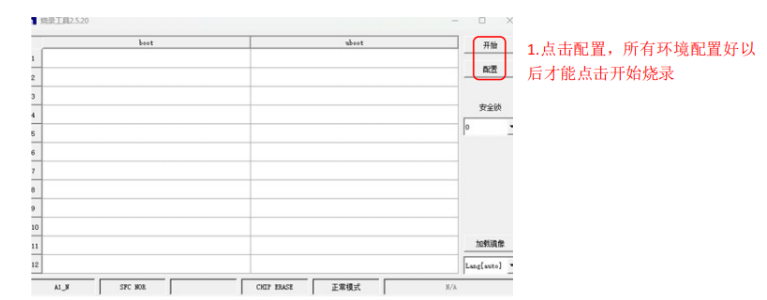
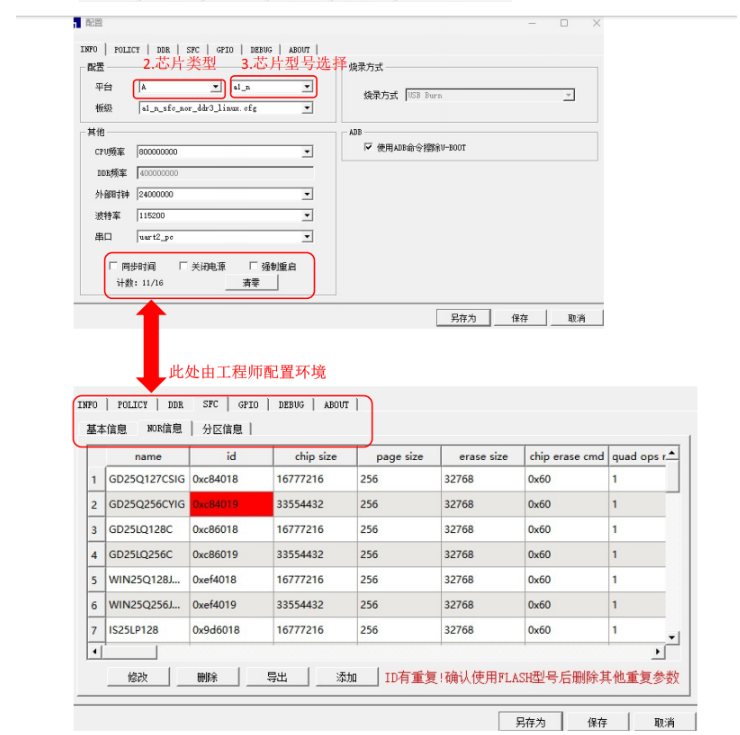
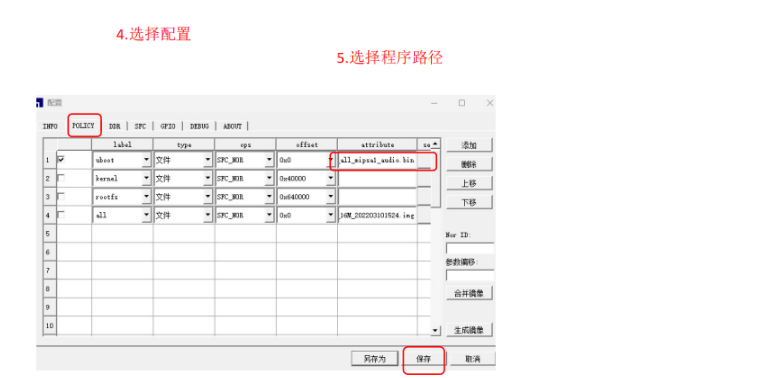
Note: after all configurations are selected, click Start. Do not plug the USB cable into the product at this time. First click Start and then switch it to the Stop state, then plug the USB flashing cable into the product. The software will then flash automatically and a progress bar will appear. Some products, in addition to being powered by USB, also require external power to be flashed normally. Wait until it reaches 100% and green text appears, then stop the software and remove the product. The flashing is now successful
Didn't find what you need?Contact us,Talk to our engineers directly.