Home / Docs Center / Platform API / Live URL API-free Use
Live URL API-free Use
Project: Platform API | page_id: 1355
Using Long-Term Links
-
- Log in to the platform and bind the device
-
- Click the device list, find the device you want to operate, and click 【Play】
-
- Select the corresponding channel; the live address is generated. Select a relatively long expiration date, so that it can be used for a long time
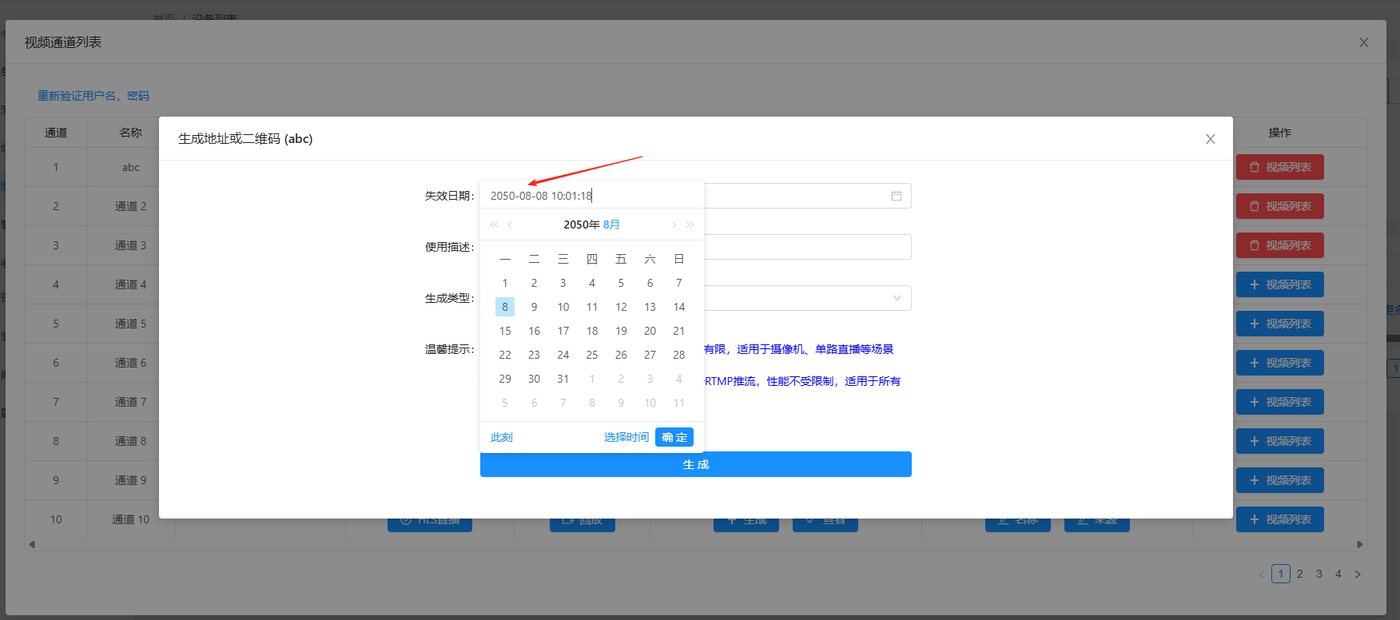
- Select the corresponding channel; the live address is generated. Select a relatively long expiration date, so that it can be used for a long time
-
- The advantage of this method is: no interface integration is required, which reduces development and maintenance costs, while still allowing the use of encrypted addresses. If an address is leaked, you can delete the current address at any time and switch to a new encrypted link
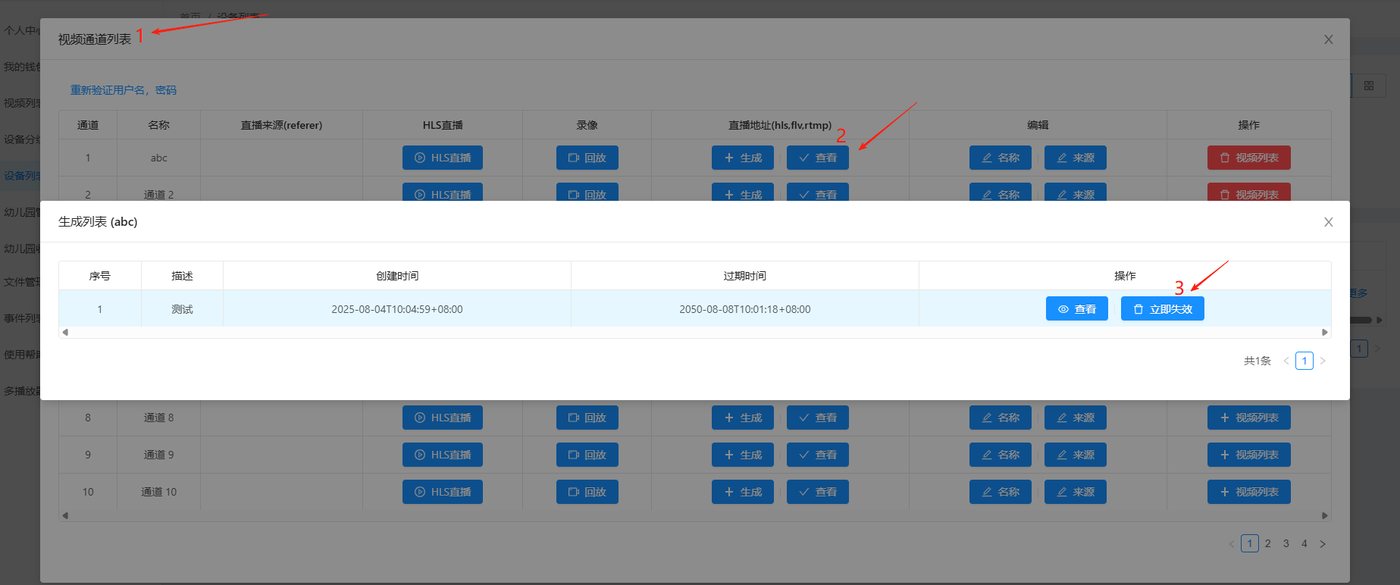
- The advantage of this method is: no interface integration is required, which reduces development and maintenance costs, while still allowing the use of encrypted addresses. If an address is leaked, you can delete the current address at any time and switch to a new encrypted link
Using Non-Encrypted Links
-
- Log in to the platform and bind the device
-
- Configure for the device whether the live address uses an encrypted link
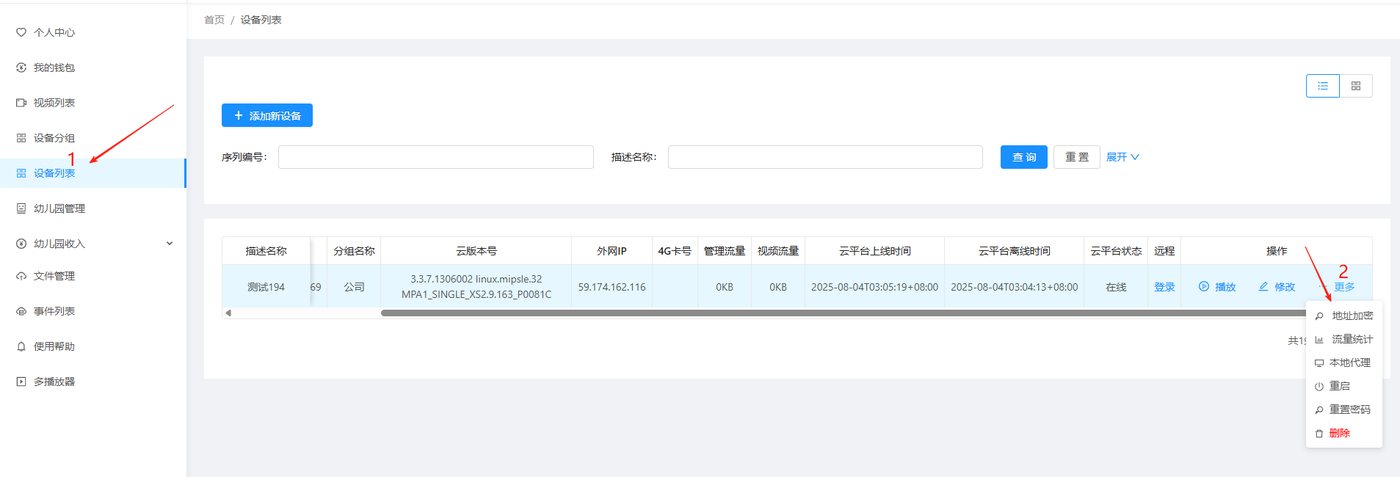
- Configure for the device whether the live address uses an encrypted link
-
- Disable live address encryption
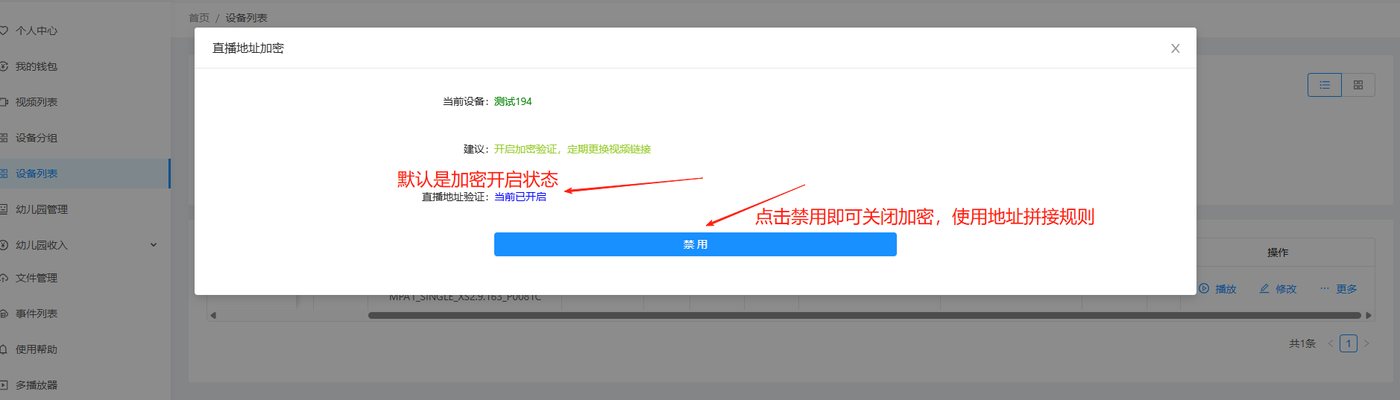
- Disable live address encryption
-
- Status after being disabled
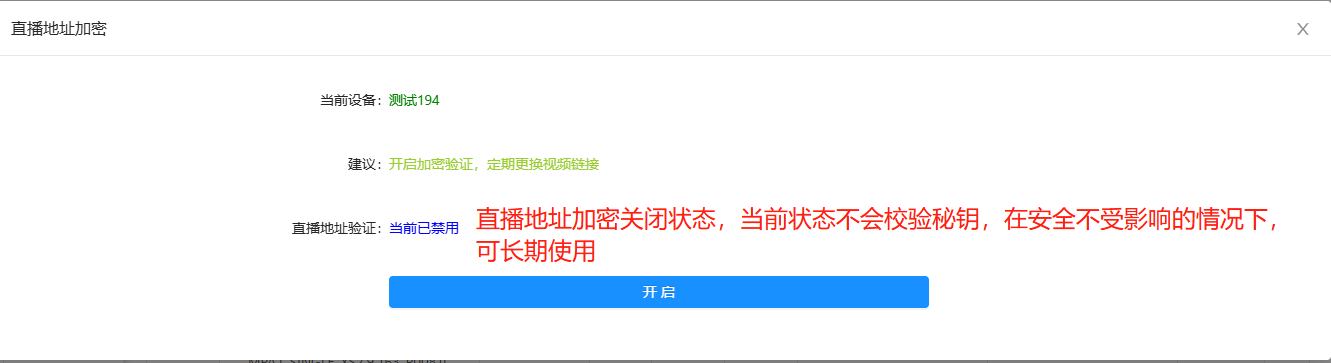
- Status after being disabled
-
- The advantage of this method is: no interface integration is required and no platform operation is needed to generate the address; you can assemble the address yourself according to the rules and play it directly
Address Assembly Rules
- Fast Live - FLV Address
【FLV address】/【device serial number】/hlsram/live【channel index, stream index】/efa4badadfa7d6e8d6c1c2845a48fa57.flv
Example:
https://flv.cloud.xstrive.com/33f60aa571232d53fd5556917413fda8/hlsram/live0/efa4badadfa7d6e8d6c1c2845a48fa57.flv
FLV address: [https://flv.cloud.xstrive.com](https://flv.cloud.xstrive.com)
Device serial number: obtained from the device home page
Channel index, stream index: starting from 0
efa4badadfa7d6e8d6c1c2845a48fa57: a fixed string consisting of lowercase letters and digits with a length of 32 characters; it can be randomly generated by yourself or kept unchanged
- Fast Live - HLS Address
【HLS address】/【device serial number】/hlsram/live【channel index, stream index】/efa4badadfa7d6e8d6c1c2845a48fa57.m3u8
Example:
https://hls.cloud.xstrive.com/33f60aa571232d53fd5556917413fda8/hlsram/live0/efa4badadfa7d6e8d6c1c2845a48fa57.m3u8
HLS address: [https://hls.cloud.xstrive.com](https://hls.cloud.xstrive.com)
Device serial number: obtained from the device home page
Channel index, stream index: starting from 0
efa4badadfa7d6e8d6c1c2845a48fa57: a fixed string consisting of lowercase letters and digits with a length of 32 characters; it can be randomly generated by yourself or kept unchanged
- Fast Live - WebRTC SDP API
【WebRTC address】/api/webrtc/cloud/play?sid=【device serial number】&streamPath=live【channel index, stream index】&sk=efa4badadfa7d6e8d6c1c2845a48fa57
Example:
https://rtc.cloud.xstrive.com/api/webrtc/cloud/play?sid=33f60aa571232d53fd5556917413fda8&streamPath=live0&sk=efa4badadfa7d6e8d6c1c2845a48fa57
WebRTC address: [https://rtc.cloud.xstrive.com](https://rtc.cloud.xstrive.com)
Device serial number: obtained from the device home page
Channel index, stream index: starting from 0
efa4badadfa7d6e8d6c1c2845a48fa57: a fixed string consisting of lowercase letters and digits with a length of 32 characters; it can be randomly generated by yourself or kept unchanged
- Low Latency - FLV Address
【FLV address】/hdl/【device serial number】/live【channel index, stream index】/efa4badadfa7d6e8d6c1c2845a48fa57.flv
Example:
https://rwen.xstrive.com/hdl/33f60aa571232d53fd5556917413fda/live0/efa4badadfa7d6e8d6c1c2845a48fa57.flv
FLV address: [https://rwen.xstrive.com](https://rwen.xstrive.com)
Device serial number: obtained from the device home page
Channel index, stream index: starting from 0
efa4badadfa7d6e8d6c1c2845a48fa57: a fixed string consisting of lowercase letters and digits with a length of 32 characters; it can be randomly generated by yourself or kept unchanged
- Low Latency - RTMP Address
【RTMP address】/【device serial number】/live【channel index, stream index】_efa4badadfa7d6e8d6c1c2845a48fa57
Example:
rtmp://rwen.xstrive.com:19352/33f60aa571232d53fd5556917413fda/live0_efa4badadfa7d6e8d6c1c2845a48fa57
RTMP address: rtmp://rwen.xstrive.com:19352
Device serial number: obtained from the device home page
Channel index, stream index: starting from 0
efa4badadfa7d6e8d6c1c2845a48fa57: a fixed string consisting of lowercase letters and digits with a length of 32 characters; it can be randomly generated by yourself or kept unchanged
Didn't find what you need?Contact us,Talk to our engineers directly.